# Introduction
**In Summary:** Multichain is the ultimate Router for web3. It is an infrastructure developed for arbitrary cross-chain interactions.
Multichain was born as Anyswap on the 20th July 2020 to service the clear needs of different and diverse blockchains to communicate with each other. Each blockchain has its own unique services that it provides, its own community and its own development ecosystem. For our industry to reach the next level for consumers, we need a fast, secure, inexpensive and reliable way to exchange value, data and exercise control between the chains.
The solutions developed by Multichain allow almost all blockchains to inter-operate. There is no restriction to Ethereum like chains (e.g. Binance Smart Chain), or different Layer 2 chains requiring finality to Ethereum (e.g. Polygon), or a network of Parachains (e.g. Moonbeam in the PolkaDot system), or Bitcoin types of chain (e.g. Litecoin), or COSMOS chains (e.g. Terra). These are either now all integrated, or on course for integration. With support for all ECDSA and EdDSA encrypted chains, Multichain is almost universally applicable as an interoperable layer.
Multichain is now the leader in the cross-chain field, with a rapidly expanding family of chains (currently 26) and daily volumes well in excess of $100 million ([https://](https://anyswap.net)[scan.mltichain.org](https://scan.multichain.org)). Its sustained daily volume of more than $100 million, its Total Value Locked in excess of $5 billion and its thousands of daily users are testament to its popularity and security.
We take pride that we are an open source protocol. Indeed to be properly described as decentralized as we are, it is essential to be open source, since otherwise how would anyone know that this was the case? We also have a strong belief in the principle of trustlessness. Anyone can use our crosschain services. They are controlled by code and there are no Externally Owned Addresses acting as a weak link.
## The SMPC Network
The Multichain network comprises what are called SMPC nodes. They exist separately from any blockchain and collectively sign transactions, but a group of them must do so together and they each only ever know part of the key to make this happen. The SMPC nodes are run by different organisations, institutions and individuals and they are incentivized to perform their functions properly.
## The Multichain Services
There are some different services that use the SMPC network
### (1) Bridge
An asset is locked up in a MPC smart contract on the source chain and then a corresponding wrapped asset is minted on the target chain. The reverse process (called Redeeming) sees the wrapped asset being burned and then the asset in smart contract being released back to the chain from where it originally came from. A bridge can therefore only ever operate between two blockchains. This was the first crosschain service developed back in July 2020, which we call V2. There are now more than 600 bridged assets and it is easy to deploy new ones, a process that takes about 2 weeks, which we can perform upon request and is free.
For many projects, our custodial bridges are still the best solution, since they do not require liquidity on each chain. They remain alongside our other methods of crosschain transfer. They are most useful when projects are launching straightforward ERC20 like tokens on new chains where they do not already have tokens. Several two way bridges can be deployed for each token.
### (2) Router
On June 4th 2021, Multichain launched its Multichain router V3 beta mainnet. The Router has these significant features:
* It can allow assets transfers between any two or more chains.
* It can work with pre-existing assets on blockchains, by using liquidity pools for those assets.
* It can also work with Bridged assets smart contract, where Multichain is responsible for minting assets on chains. This allows a generalisation of Bridges, so that assets are not restricted to having to return to their source chain before being sent to another chain. This makes for a cost effective solution for users, especially if the asset originated on Ethereum.
* The Router can include both native and Bridged assets. This allows inclusion of assets that might have been generated with a third party bridge (though we would need to understand what bridges were originally used).
### (3) anyCall Crosschain Contract Calls
With the anyCall smart contract function, projects can now make cross-chain contract calls, all with the security of Multichain's MPC network.
### (4) Crosschain NFT Bridges and Router
Multichain now offers a bridge for NFT's (both ERC721 and ERC1155 smart contract standards). We also now have a Router for NFT's.
Please see How it Works for a more in depth discussion about SMPC networks and how Bridges and the Router work.
# Supported Chains
Supported Chains and the network settings
So far, Multichain has established routing channels between >25 blockchains to realize the free interaction of assets among these ecosystems. The following is a list of these blockchains supported by Multichain.
### Supported chains
#### EVM chains
#### Bitcoin-like chains
| Name | Currency Symbol | Explorer |
| -------------- | --------------- | ------------------------------------- |
| **Bitcoin** | BTC | |
| **Blocknet** | BLOCK | |
| **ColossusXT** | COLX | |
| **Litecoin** | LTC | |
#### Others
| Name | Explorer | Wallet |
| --------- | ----------------------------- | ----------------------------------------------------------------------------- |
| **Terra** | | |
# Supported Tokens
Currently, over 1,100 tokens are supported by Multichain. The cross-chain infrastructure built based on the Multichain Cross-link Route Protocol (CRP) provides significant advantages and competitive services to the blockchain and DEFI project parties.These advantages are reflected in the following:
### **1. Multi-chain token issue**
By working with Multichain, the new project will be able to link their tokens to multiple blockchain ecosystems with one step.
### **2. Free listing**
Through the application channel on Multichain official website, the listing requests could be submitted independently and listed without fee.
### **3. Quick deployment**
For successfully applied projects, the deployment will be completed within 3 days to 1 week.
### **4. Easy Integration**
Cross-chain services implemented with Multichain CRP enable convenient integration with project party applications without targeted secondary development by project parties.
The list of supported tokens could be checked anytime via [Multichain's official website](https://anyswap.net/tokens).
# How it works
{% hint style="info" %}
**Some Background**: The distributed key algorithm used by Multichain was derived from the ground breaking work of Steven Goldfeder (Offchain Labs, Cornell Tech) and Rosario Gennero (City College, CUNY). Their paper of 2019, referred to as GG20, has been implemented in new code by Multichain and continuously improved. We dive deep here to see how Multichain's core functions use distributed key algorithm.
{% endhint %}
The use of a single signature to send assets, or interact with smart contracts cross-chain, results in a single point of failure. This Externally Owned Address can be compromised with poor key custody. One approach has been to use Multi Signature Wallets, so that several signatures are required to make a transaction. The problems here are :-
(a) These keys are still Externally Owned Addresses,
(b) The signers have to be pre-defined and this is inflexible,
(c) The signing addresses are public, so that the access structure is known to everyone,
(d) The data for signing is large, possibly requiring many keys.
The solution is to use Threshold Signature Schemes (TSS), splitting the key up. From n possible signatories, a minimum of any t (n/2+1≤ t ≤ n) signatories can sign a transaction. Only at least t colluding players can forge the signature. This has these advantages:-
(a) It is private so that no one knows which t signers were used,
(b) If there are many possible signatories, then well performing ones can be chosen,
(c) It is efficient since only a single signature goes on the chain, looking like a regular signature.
Multichain's SMPC Network
At the heart of Multichain is its Secure Multi Party Computation (SMPC) Multichain network of nodes, which implements with the TSS Distributed Key Generation algorithm. This code has been completely and freshly written by Multichain's engineers and is optimised for multichain applications. Each node in a set, selected from the network, works independently from the others to generate part of the private key responsible for signing transactions. They collectively sign transactions, but crucially they cannot individually do so and the key is not reconstructed when signing. The complete key is never assembled and so it cannot be intercepted.
This is accomplished by several rounds of communication between the t+1 nodes. If one sends a bad message, then it is important that this node can be recognised, otherwise there is the possibility of a Dedicated Denial of Service Attack. GG20 solves this using an elegant property of the ECDSA algorithm, so that R, the part of the signature from a node can be used to query whether it was at fault (the 'bad actor'). Other features present in GG20 that increase efficiency are the ability to have Asynchronous Approval, where a large number of signatures can be pre-computed, calculating the R factor in the ECDSA signatures, before they are needed. This encompasses most of the computation and communication, with only the final round of communication necessary to actually sign the message, with all t nodes online at this stage. This means that for the bulk of the work, there is no longer the need for all nodes to be online simultaneously, with the implication that some network latency can be accommodated.
The SMPC network is responsible for signing transactions on each supported blockchain to perform a multitude of tasks comprising the management of asset accounts and smart contracts. A Threshold, will be needed to sign the transaction. This Threshold Signature (TSS) is denoted as (t, n), such as (9,15), (15,21), (21,31) etc., where t is the number of nodes needed to sign, and n is the total number of nodes in the set.
The nodes are run by different organisations, institutions and individuals, which independently run Multichain's protocol. The end result is a decentralized and trustless service. Multichains's code is completely open source, which is a pre-requisite of any system that describes itself as being decentralized. There is an inevitable trade-off between security and performance as the total number nodes and the threshold are changed. For the security of the system to be broken, t TSS nodes would have to collude to assemble the private key, but as t increases, this eventuality becomes vanishingly rare and this has not happened despite the length of time the network has been running and the huge TVL and daily volume that exists today on Multichain's network. Another possible security flaw rests on each blockchain itself. It is necessary to wait for a sufficient number of confirmations before finality can be agreed upon and so that any short lived forks cannot result in a double spend. These are the issues that ultimately limit the potential speed of cross-chain transactions.
# Cross-Chain Bridge
{% hint style="info" %}
**The Cross-Chain Bridges are a foundation block of Multichain**: A Bridge allows an asset on one chain to be 'sent' to another chain.
{% endhint %}


**The Cross-Chain Bridges**
Each Bridge is a link between two block chains. On the asset origin chain, the asset to be bridged is sent to a special SMPC wallet address and held securely there. This is the Decentralized Management Account. On the destination chain, a smart contract mints tokens 1:1 with those held in the Decentralized Management Account and sends them to the user's wallet. The opposite also happens when tokens are sent to the smart contract; they are burned and then the SMPC nodes release them on the origin chain.
The SMPC nodes perform several functions in linking an origin blockchain with a destination blockchain, completely autonomously and without human intervention :-
(a) When a new bridge between two blockchains is created, the SMPC nodes generate the Decentralized Management Account whose address is used to send assets to. These assets are held securely whilst cross-chain assets are minted on the destination chain. This address is only controlled by the SMPC nodes and not by human or any other Externally Owned Address.
(b) Also, when a new bridge between two blockchains is created, the SMPC nodes connect to a new smart contract on the destination chain for Wrapped Assets. This contract can be created by third party or the Multichain team. It is used to mint new tokens on the destination chain, or to burn them when assets are redeemed to their origin chain. This contract is either AnyswapV5ERC20.sol, or a contract adapted from this to include custom code required by a project, such as transaction tax etc.
(c) The MPC nodes monitor the Decentralized Management Account. When a new asset arrives there, it triggers the Wrapped Asset smart contract on the destination chain to mint tokens.
(d) If assets are redeemed, the Wrapped Asset smart contract is triggered by the MPC nodes to burn the tokens. The MPC nodes then release the assets from the Decentralized Management Account and send them to the user on the origin chain.
The wrapped asset token contract AnyswapV5ERC20 on the destination chain, which is a superset of the standard ERC20 type of contract, only allows MPC nodes network to mint assets. No other address is allowed to mint, to prevent a non-equivalence between assets held by the SMPC address and those wrapped assets created. For this reason, some common asset types are not suitable for Bridges, including elastic supply (or rebase) tokens.
# Cross-Chain Router
{% hint style="info" %}
**The Cross-Chain Router:** Enables any assets to be transferred between multiple chains, no matter if they are native or created with Multichain's Bridge.
{% endhint %}
The Multichain allows assets to be transferred between two or more blockchains. There are three categories of Routing transfer that we can consider: -
### **(a)** Native Assets
When a token already exists on a chain, we refer to it as a native asset. An example is USDC. In this instance, Multichain cannot mint the asset, so instead we use liquidity pools. A number of tokens are added by Multichain, a project team, or individuals to the pool on each chain. These tokens are then available for a user when they move cross chains. Ideally there are enough on each chain so that no matter how many tokens are transferred, there are enough in the pool for them. When a user moves say N XYZ tokens from chain A to chain B, those N tokens are available for another user who is transferring XYX from chain B (or chains C, D, E etc.) to chain A. They enter the liquidity pool on chain A. The total number of XYZ in the liquidity pools on all chains remains the same (unless extra XYZ are specifically added or removed by someone to the pools).
This would work well except that it is necessary to cope with the case where a user sends XYZ to a chain, but there is not enough XYZ in the pool for them to withdraw. This is why there are anyXYZ tokens created. These CAN be minted by Multichain on each chain and they represent the number of XYZ that the user SHOULD receive on that chain. If there are enough XYZ on the chain, then the anyXYZ are automatically swapped for those XYZ and the anyXYZ are burned. If there are not enough XYZ on the chain, then the user is left with their anyXYZ (called 'Your Pool Share') and they have to manually 'Remove' them, converting anyXYZ to XYZ when sufficient XYZ become available again. Remember - the number of XYZ in the pool on a chain increases when someone Routes XYZ away from that chain to another chain, or when someone specifically adds XYZ to the pool on that chain.
The sequence that is followed when a user transfers XYZ from chain A to chain B is: -
(i) The XYZ is added to the pool on chain A.
(ii) The same number of anyXYZ are minted on chain A.
(iii) The SMPC node network detects this and causes anyXYZ to be minted on chain B, burning those on chain A.
(iv) If the number of XYZ on chain B is greater than the anyXYZ created, then the XYZ are sent to the user's wallet on chain B and the anyXYZ are burned on chain B. If the number of XYZ is less than anyXYZ, then the user is left with their anyXYZ and this represents their pool share to be redeemed later by them for XYZ when there are enough again (by 'Removing' them).

### (b) Bridged Assets
When the Router uses assets which are created using AnyswapV5ERC20.sol, or a modified version of it, (Bridged assets), there is no need for a liquidity pool for the asset, since Multichain controls the supply of the asset on the chain where the contract resides. In this case the pool size is 'Unlimited'. For a Routed asset whose cross-chain minting is entirely controlled by AnyswapV5ERC20, all that is required, is that a supply of that asset is added to the pool on the chain where the token was originally minted. A good example of this is MIM, which is created on Ethereum as a collateralized asset and which has a series of bridges to other chains (using AnyswapV5ERC20). These bridges are incorporated into the Router.

The use of exclusively Bridged assets in the Router leads to the best user experience, since they do not need to be concerned about the liquidity supply on the target chain.
### **(c)** Hybrid Native/Bridged Assets
Sometimes it is necessary to combine native assets on some chains with assets controlled by Multichain's Bridges (AnyswapV5ERC20.sol). This often happens when a project minted a supply of that token, or already had a third-party bridge for an asset on another chain, but after joining the Router, wished to add tokens on extra chains. In this instance, the pre-existing tokens are 'native', but the tokens on new chains are 'Bridged'. It is the responsibility of the project team to ensure that there is sufficient liquidity in the pool for assets which are native on a chain, but the liquidity on chains for which Bridges exist is 'Unlimited'. Here is an example of a Router hybrid asset.

For FTM, The Router uses native FTM on Ethereum, Binance Smart Chain and Fantom Opera, but is Bridged to Cronos, Telos, Boba, Celo and Harmony.
**Notes**:
In order to promote the efficiency of liquidity and reduce users' cross-chain cost, for some tokens, liquidity is shared between Router and Bridge on some famous and reliable chains by a share liquidity tool powered by SMPC network.
However, it does not run very often and generally only provides a small part of initial liquidity. Whose security has been carefully evaluated and verified, all possible risks can be afforded, security measures including but not limited to Chain TVL Limited, Security Fund, Suspension, Watch Dog, ...
# Governance Token
Current token status. Subsequent new proportional allocation is updated after voting.
$MULTI is the governance token used to allow MULTI token holders to vote and participate in governance of the Community and Ecosystem.
Evolved from Anyswap, a decentralized cross-chain swap protocol with DEX trading and liquidity mining rewards, Multichain is re-positioned as an infrastructure developed for arbitrary cross-chain interactions, an ultimate router for Web 3. Here we will explain to you the MULTI Tokenomics.
The total supply of MULTI will be 100 million according to the fixed exchange ratio with ANY (ANY:MULTI=1:1) as the total supply of ANY is 100 million. Currently, [ANY circulating supply is 18,639,320, accounting for 18.64% of the total](https://anyswap.medium.com/any-tokenomics-from-inflation-to-deflation-a2ca2b482051). Once the swap is completed, MULTI circulation will be 18,639,320 while the uncirculated accounts for 81.36%.
The uncirculated MULTI tokens are locked in the smart contracts, and it's specific use is determined by the DAO. Meanwhile, ANY Tokenomics for repurchase and destruction will also be upgraded to the veMULTI model. For details, stay tuned to our follow-up announcement.
# VeMulti
VeMulti stands for vote escrow Multi. Multi holders are able to lock up their Multi tokens and gain vote powers in the protocol.
We are thrilled to announce that veMULTI mainnet is officially launched today May 9th, 2022. Stake your MULTI to mint veMULTI NFT and make your voice heard in Multichain community. Q1 2022 Multichain bridge fees ($ 3,901,975.04) will be distributed in USDC over the following 9 weeks, until July 14th.
**Link:**
**Supported chains**: Ethereum, BNB chain, Fantom chain
**When:**
* MULTI staking opened on May 9th at 10:00 AM (UTC)
* The first snapshot was on May 12th at 02:00 AM (UTC)
* Reward claims started on May 12th after 02:00 AM (UTC)
{% hint style="info" %}
Snapshots take place every Thursday at 02:00 AM (UTC), and reward claims begin shortly afterward. Rewards are calculated on a weekly basis after every Thursday’s snapshot.
{% endhint %}
**What is veMULTI?**
veMULTI is the governing scheme for multiDAO. Anyone who stakes MULTI will receive veMULTI NFT. The NFT holders will have the power to initiate and vote for the governance proposals. The rights and power are determined by the MULTI amount and lock duration.
* 1 MULTI locked for 4 years = 1.00 veMULTI
* 1 MULTI locked for 3 years = 0.75 veMULTI
* 1 MULTI locked for 2 years = 0.50 veMULTI
* 1 MULTI locked for 1 years = 0.25 veMULTI
veMULTI NFT is the first tradable NFT with which there are juicy rewards to be distributed on a weekly basis in addition to the NFT value.
You are allowed to extend the locking durations before it expires. Once your lock expires, you can withdraw your MULTI after you claim all the rewards.
**How to Stake**
1. Get your MULTI prepared
2\. Visit and connect to any of the supported networks (Ethereum, BNB chain, Fantom chain)
3\. Create Lock
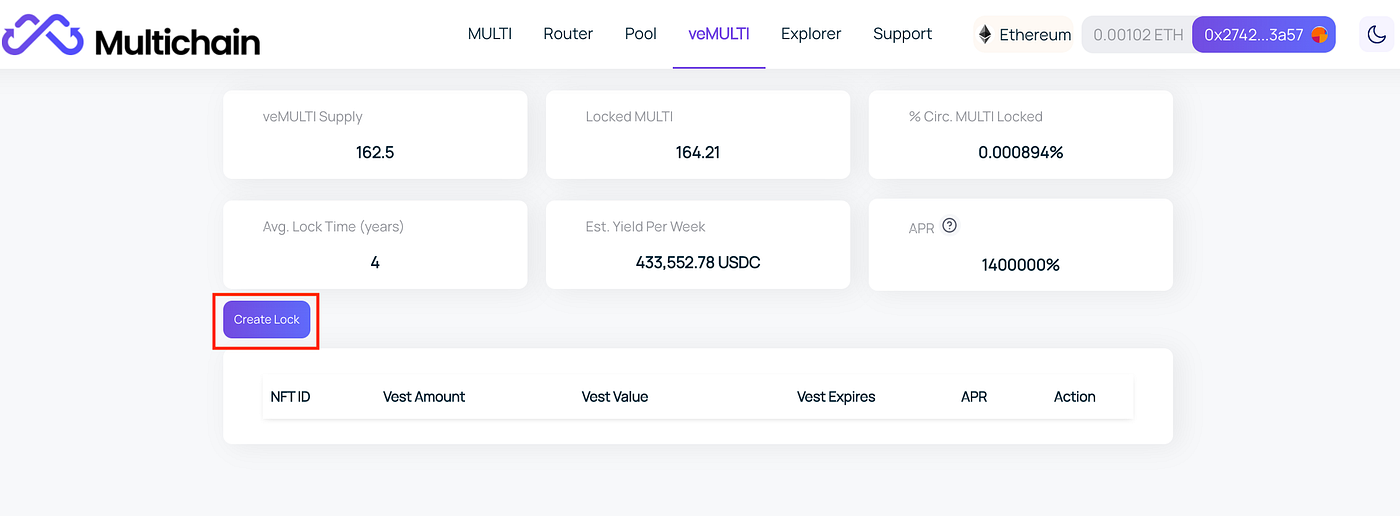
4\. Enter MULTI amount and confirm contract approval
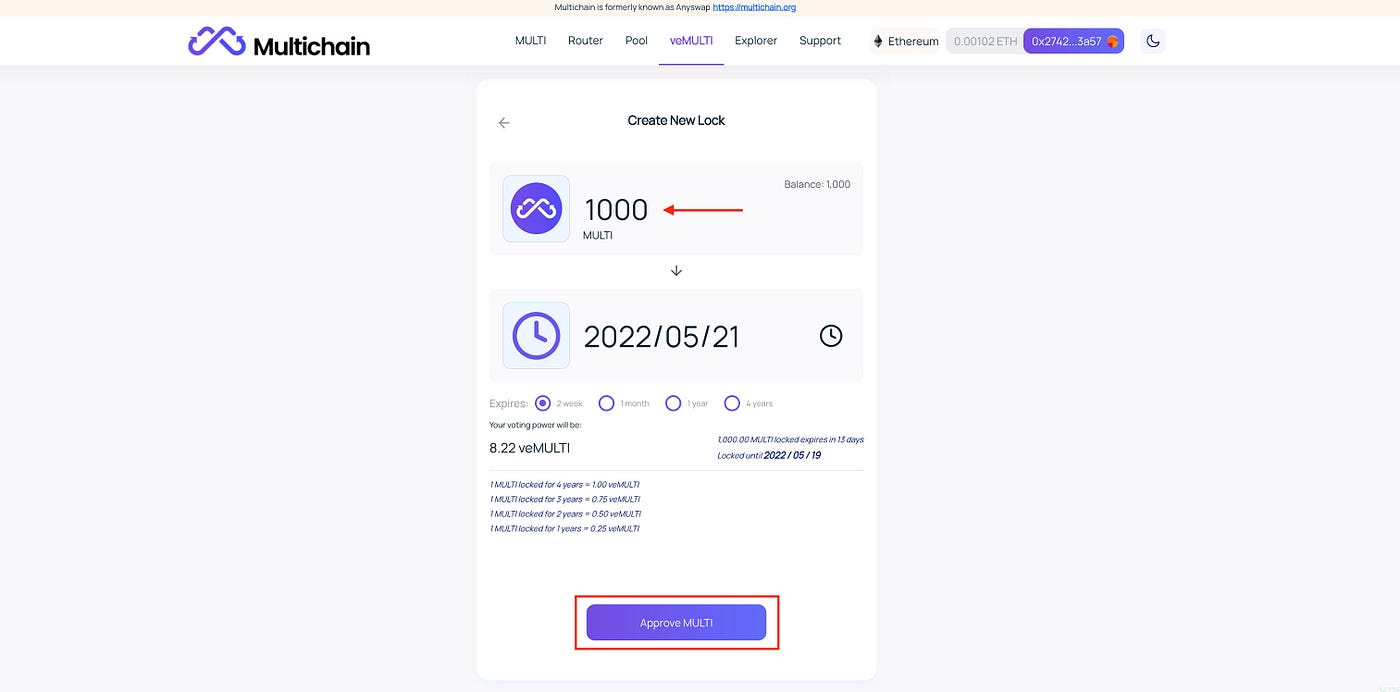
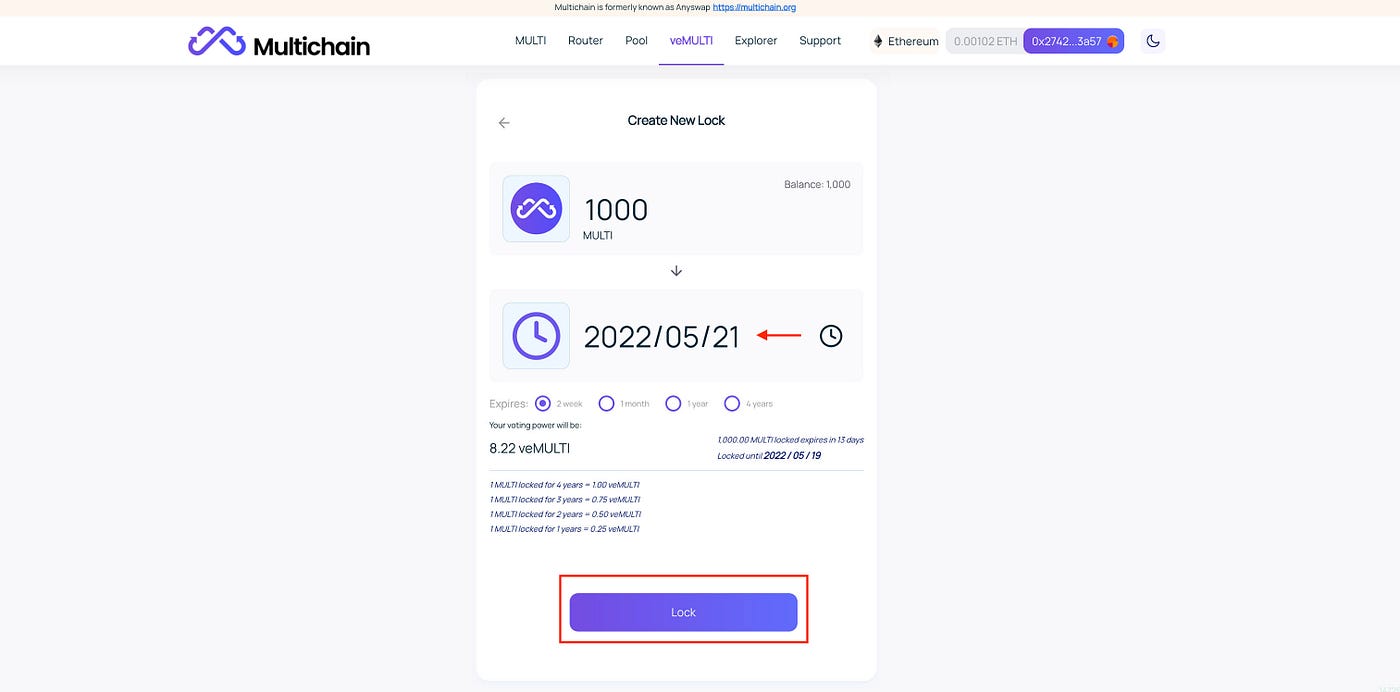
5\. Select locking duration and lock MULTI
**Contract Address**
* veMULTI Contract Ethereum:[ 0xbba4115ecb1f811061ecb5a8dc8fcdee2748ceba](https://etherscan.io/address/0xbba4115ecb1f811061ecb5a8dc8fcdee2748ceba)
* Reward Contract on Ethereum:[ 0x44529a37a43bab8af2336698e31f2e4585ad7db6](https://cn.etherscan.com/address/0x44529a37a43bab8af2336698e31f2e4585ad7db6)
* veMULTI Contract on Fantom: [0xE564cBcD78A76fD0Bb716a8e4252DFF06C2e4AE7](https://ftmscan.com/address/0xE564cBcD78A76fD0Bb716a8e4252DFF06C2e4AE7)
* Reward Contract on Fantom: [0xaC9CB5934948b96949A4CF1F8DfbA13f617d2836](https://ftmscan.com/address/0xac9cb5934948b96949a4cf1f8dfba13f617d2836)
* veMULTI Contract on BNB Chain: [0x3f6727DefB15996d13b3461DAE0Ba7263CA3CAc5](https://bscscan.com/address/0x3f6727DefB15996d13b3461DAE0Ba7263CA3CAc5)
* Reward Contract on BNB Chain: [0x9Db42b603fE859d07656c579326F71e3EC80c726](https://bscscan.com/address/0x9Db42b603fE859d07656c579326F71e3EC80c726)
**More info:**
Read [veMULTI proposal](https://medium.com/multichainorg/vemulti-proposal-stake-multi-get-multichain-fees-rewards-d8d13b9e20cb) and [code audit](https://github.com/anyswap/Anyswap-Audit/blob/master/BlockSec/blocksec_audit_multichain_v1.0-signed.pdf)
### FAQS
1. **What’s veMULTI?**
Stake MULTI to get veMULTI NFT — a locked state of MULTI, in the form of tradeable NFT. With veMULTI, you will be able to participate in Multichain governance and receive Multichain bridge fees.
**2. What can I get from veMULTI?**
In addition to bridge fees distribution, veMULTI grants its holders voting power. Anyone who stakes MULTI will receive a percentage of veMULTI, the power of which is determined by the locked MULTI amounts and the locking durations. As per the scheme:
* 1 MULTI locked for 4 years = 1.00 veMULTI
* 1 MULTI locked for 3 years = 0.75 veMULTI
* 1 MULTI locked for 2 years = 0.50 veMULTI
* 1 MULTI locked for 1 years = 0.25 veMULTI
**3. I lock MULTI for 4 years, why am I getting less veMULTIs rather than 1 MULTI : 1veMULTI**
It is because locktime is rounded down to weeks. The locking period recorded by the veMULTI system is shorter than the actual one.
**4. How many rewards will be distributed?**
According to the veMULTI proposal, 45% of the quarterly bridge fees will be distributed as rewards and dispersed every quarter. $3,901,975.04 bridge fees from Q1 2022 will be distributed in Q2 2022.
**5. On which blockchain does veMULTI launch?**
veMULTI is launched on Ethereum as MULTI is originally launched on Ethereum.
**6. How long should I lock MULTI?**
It’s totally up to you. The maximum lock-up time is 4 years. The longer you lock MULTI, the more benefits you receive.
**7. When can I stake MULTI?**
Staking will be open on May 9th at 10:00 AM UTC and you can stake anytime after that.
**8. When will the rewards begin?**
Rewards distribution started on May 12th at 02:00 AM UTC and it's ongoing.
**9. When can I claim rewards?**
USDC rewards will be calculated on a weekly basis after every Thursday’s snapshot. For example, if you stake MULTI before the first snapshot on May 12th at 02:00 AM UTC, you will be able to claim rewards afterward.
**10. How many times can I claim rewards?**
You can claim rewards multiple times during the weekly emission period, but you need to pay attention to the gas fee of your claiming tx, which is proportionate to the number of weeks you claimed.
**11. What could I do if I forget to claim rewards?**
Your rewards build up and you can claim whenever.
**12. How are rewards calculated?**
Rewards will be calculated by the reward contract according to your power of veMULTI. The more veMulti you hold, more rewards you get. \
For more information, please refer to the reward contract
**13. What will happen to my veMULTI as time passes?**
If you don’t extend the locking durations, your veMULTI power will decay linearly over time.
# How to Convert ANY to MULTI
### C**onversion Rules**
1. Conversion ratio: ANY: MULTI=1:1, 1 ANY to be converted to 1 MULTI
2. Starting Date & time: UTC 8:00 am, December 17, 2021 (no time limit set for the conversion)
3. Conversion channel: Multichain official website:[ https://multichain.org](https://multichain.org/)
4. Conversion direction: A one-way swap to convert ANY to MULTI
5. Conversion Network: ETH network (only)
6. Conversion fees: ETH gas fee
***Contract Address of ANY and MULTI***
1. ANY contract address on ETH network: [0xf99d58e463a2e07e5692127302c20a191861b4d6](https://etherscan.io/address/0xf99d58e463a2e07e5692127302c20a191861b4d6)
2. MULTI contract address on ETH network: [0x65ef703f5594d2573eb71aaf55bc0cb548492df4](https://etherscan.io/address/0x65ef703f5594d2573eb71aaf55bc0cb548492df4)
3. Contract address for ANY converting to MULTI on ETH network: [0xaed0472b498548B1354925d222B832b99Bb2EC60](https://etherscan.io/address/0xaed0472b498548B1354925d222B832b99Bb2EC60)
### **Conversion Procedures**
MetaMask wallet is used here as an example to explain ANY-MULTI swap process:
1\). Enter into Multichain official website: [https://Multichain.org](https://multichain.org/)

2\). Set up your wallet on Multichain. Click on “Connect Wallet” and the connection will be successful if the wallet account is displayed in the upper right corner. Also, please make sure that MetaMask is connected to the **ETH network**.

3\). Approve ANY. Fill in the 'ANY' amount you want to convert and then click on 'Approve ANY'. Please wait for MetaMask to confirm.
Please note that contract approval is a once-off process for the first ANY-MULTI swap. You will not go through it again next time.

4\). Convert ‘ANY’ to ‘MULTI”. Fill in the ‘ANY’ amount that you want to convert and then click on ‘Swap’.

5\). All transaction details can be checked via
Except for MetaMask wallet, users can also use OKEx, Coin98, WalletConnect, Coinbase Wallet, BitKeep, etc. to convert ANY to MULTI.
### **Notes**
1\. The conversion will only be initiated by ANY holders. Multichain will not enforce token conversion.
2\. No time limit is set for conversion. Users can convert at any time from the starting date.
3\. The conversion needs to be done within the ETH network, which means users need to transfer ANY to the ETH network before the conversion. They will need ETH for gas (including for the Contract Approval).
4\. It is a one-way swap to convert ANY to MULTI; the other way around is not supported.
5\. Once ANY is converted to MULTI, converted ANY will be locked in the smart contract.
6\. You can convert ANY to MULTI via the official website, while more channels for conversion will be available soon (e.g., Binance Exchange). Please await later announcements.
7\. MULTI users can trade MULTI on DEX including Sushiswap, Spookyswap, Spiritswap, Apeswap and Solarbeam, etc. More channels will be released soon.
# Security
# Security model
{% hint style="info" %}
**Summary:** Security is Multichain's top priority.
{% endhint %}
## Security model
### **Threshold distributed signature algorithm**
Multichain cross-chain solution is a threshold distributed signature algorithm based on secure multi-party computation (SMPC). This algorithm enables the generation of a set of private keys on independently run nodes and then a corresponding public key will be produced through distributed computation. Compared with technologies such as secret sharing, it’s impossible to access or reveal private keys as no complete private keys have been shown during the whole process. In addition, during distributed computation, each node will not pass private keys that they hold between each other. MPC makes sure that the intermediate results generated during distributed computation can’t be used to derive corresponding private keys.
The application of the algorithm in the cross-chain interconnection of digital assets is a decentralized way to handle digital assets safely and effectively.
### **The SMPC Network of Multichain**
The threshold distributed signature algorithm is implemented in code. This core algorithm needs to be executed by a distributed system, which is Multichain's SMPC Network. It is composed of several independently operated and maintained nodes, and these nodes execute threshold distributed signature algorithms when they need to initialize to generate public keys or perform signatures.
To realize the cross-chain interaction of digital assets, MPC Network is required to be a distributed network that processes cross-chain requests in real time between chains. This is reflected in a trigger mechanism where the status on the original chain is detected in real time and then translated into the behavior on the target chain. The current MPC Network is a distributed system. Each node will independently verify the status of the original chain, and use a threshold distributed signature algorithm between all nodes to reach a consensus on the verification results.
This method, which is based on cryptographic algorithm, can lead to strong consensus. It either produces consistent correct results or no results. This ensures that Multichain’s MPC Network can accurately process cross-chain requests in real time.
### **Multichain’s multiple chain assets protocol: Cross-Chain Router Protocol (CRP)**
The collaboration of the entire distributed system creates a general management protocol for multiple-chain assets: Cross-Chain Router Protocol (CRP). The cross-chain infrastructure of Multichain that is based on CRP is available to the public. Using open-source software protocol, the source code, development and maintenance of the infrastructure can be found on Github.
### **Academic alliance and code auditing**
Cryptography is an evolving discipline and guarding against security attacks is a long-term task. Multichain is closely watching the development of relevant cutting-edge technologies and investing heavily on technological innovation and cyber security.
Multichain is building an academic alliance with global cryptography experts specializing in threshold signature algorithm and MPC, in order to keep up with the latest developments in relevant technologies and push for technological innovation.
Multichain has built long-term partnership with world leading third-party code auditing companies to conduct code auditing of every version or important updates of codes. For more details, please refer to our latest code auditing report.
**Bug bonus system and security fund**
At Multichain, we set up a bonus system to reward community users who make an effective report on bugs. See "[Bug Bonus Program](/getting-started/security/bug-bounty-immunefi)" for more details.
Multichain will also establish and expand its security fund, which can provide guarantee for the functioning of system and the security of assets. See "Security Fund Plan" for more details.
### Multichain Audits
Please visit our github for [Multichain Audit Reports](https://github.com/anyswap/Anyswap-Audit/find/master)
# Bug bounty (Immunefi)
{% hint style="info" %}
**Summary:** We recognise that gifted coders may find vulnerabilities in our code that we could not - even though our products have yet to be compromised.
**Note**: We orginized Bug bounty with **Immunefi** (), however, if some vulnerabilities you found is out of scope according to rules of Immunefi, you can report it through mail **** directly.
{% endhint %}
**Multichain Bug Bounties up to $2M**
This bug bounty program is focused on Multichain's smart contracts, website and app and is focused on preventing:
* Any governance voting result manipulation
* Direct theft of any user funds, whether at-rest or in-motion, other than unclaimed yield
* Permanent freezing of funds
* Miner-extractable value (MEV)
* Insolvency
**Rewards by threat level**
Rewards are distributed according to the impact of the vulnerability based on the [Immunefi Vulnerability Severity Classification System V2](https://immunefi.com/immunefi-vulnerability-severity-classification-system-v2/). This is a simplified 5-level scale, with separate scales for websites/apps, smart contracts, and blockchains/DLTs, focusing on the impact of the vulnerability reported.
**Smart Contracts**
| Level | **Rewards** |
| -------- | ----------------------- |
| Critical | **Up to USD 2 000 000** |
| High | **USD 100 000** |
| Medium | **USD 10 000** |
| Low | **USD 1 000** |
**Websites and Applications**
| Level | **Rewards** |
| -------- | --------------- |
| Critical | **USD 200 000** |
| High | **USD 50 000** |
| Medium | **USD 5 000** |
| Low | **USD 1 000** |
All web/app bug reports must come with a PoC with an end-effect impacting an asset-in-scope in order to be considered for a reward. All Critical Smart Contract bug reports require a PoC and a suggestion for a fix to be eligible for a reward. Explanations and statements are not accepted as PoC and code is required.
Critical smart contract vulnerabilities are capped at 10% of economic damage, primarily taking into consideration funds at risk, but also PR and branding aspects, at the discretion of the team. However, there is a minimum reward of **USD 100 000.**
All vulnerabilities marked in the [security reviews](https://github.com/anyswap/Anyswap-Audit) are not eligible for a reward.
Payouts are handled by the **Multichain** teamdirectly and are denominated in USD. However, payouts are done in **USDC**.
**Assets in Scope**
| **Target** | **Type** |
| ------------------------------------------------------------------------------ | --------------------------------- |
| | Smart Contract - AnyswapV6Router |
| | Smart Contract - AnyswapV6ERC20 |
| | Smart Contract - AnyCallProxy |
| | Smart Contract - MultiDao |
| | Smart Contract - SwapTokens |
| | Smart Contract - MultichainToken |
| | Web/App - Main Web App Multichain |
| | Web/App - Anyswap |
| | Web/App - Main App |
All smart contracts of Multichain can be found at . However, only those in the Assets in Scope table are considered as in-scope of the bug bounty program.
If an impact can be caused to any other asset managed by Multichain that isn't on this table but for which the impact is in the Impacts in Scope section, you are encouraged to submit it for the consideration of the project. This applies to only Critical and High impacts.
**Impacts in Scope**
Only the following impacts are accepted within this bug bounty program. All other impacts are not considered as in-scope, even if they affect something in the assets in the scope table.
**Smart Contracts**
**Critical**
* Any governance voting result manipulation
* Direct theft of any user funds, whether at-rest or in-motion, other than unclaimed yield
* Permanent freezing of funds
* Miner-extractable value (MEV)
* Insolvency
**High**
* Theft of unclaimed yield
* Permanent freezing of unclaimed yield
* Temporary freezing of funds for a minimum period of 2 days
**Medium**
* Smart contract unable to operate due to lack of funds
* Block stuffing for profit
* Griefing (e.g. no profit motive for an attacker, but damage to the users or the protocol)
* Theft of gas
* Unbounded gas consumption
**Low**
* Smart contract fails to deliver promised returns, but doesn't lose value
**Websites and Applications**
**Critical**
* Ability to execute system commands
* Extract Sensitive data/files from the server such as /etc/passwd
* Stealing User Cookies
* Taking Down the application/website
* Bypassing Authentication
* Signing transactions for other users
* Redirection of user deposits and withdrawals
* Subdomain takeover resulting in financial loss (applicable for subdomains with addresses published)
* Wallet interaction modification resulting in financial loss
* Direct theft of user funds
* Tampering with transactions submitted to the user's wallet
* Submitting malicious transactions to an already-connected wallet
**High**
* Spoofing content on the target application (Persistent)
* Users Confidential information disclosure such as Email
* Subdomain Takeover without financial loss (applicable for subdomains with no addresses published)
* Privilege escalation to access unauthorized functionalities
**Medium**
* Changing details of other users without direct financial impact (CSRF)
* Third-Party API keys leakage that demonstrates loss of funds or modification on the website.
* Redirecting users to malicious websites (Open Redirect)
**Low**
* Framing sensitive pages leading to financial loss (ClickJacking)
* Any impact involving a publicly released CVE without a working PoC
* Broken Link Hijacking
**Out of Scope & Rules**
The following vulnerabilities are excluded from the rewards for this bug bounty program:
* Attacks that the reporter has already exploited themselves, leading to damage
* Attacks requiring access to leaked keys/credentials
* Attacks requiring access to privileged addresses (governance, strategist)
**Smart Contracts and Blockchain**
* Incorrect data supplied by third party oracles
* Not to exclude oracle manipulation/flash loan attacks
* Basic economic governance attacks (e.g. 51% attack)
* Lack of liquidity
* Best practice critiques
* Sybil attacks
* Centralization risks
**Websites and Apps**
* Theoretical vulnerabilities without any proof or demonstration
* Content spoofing / Text injection issues
* Self-XSS
* Captcha bypass using OCR
* CSRF with no security impact (logout CSRF, change language, etc.)
* Missing HTTP Security Headers (such as X-FRAME-OPTIONS) or cookie security flags (such as "httponly")
* Server-side information disclosure such as IPs, server names, and most stack traces
* Vulnerabilities used to enumerate or confirm the existence of users or tenants
* Vulnerabilities requiring unlikely user actions
* URL Redirects (unless combined with another vulnerability to produce a more severe vulnerability)
* Lack of SSL/TLS best practices
* DDoS vulnerabilities
* Attacks requiring privileged access from within the organization
* Feature requests
* Best practices
* Vulnerabilities primarily caused by browser/plugin defects
* Any vulnerability exploit requiring CSP bypass resulting from a browser bug
The following activities are prohibited by this bug bounty program:
* Any testing with mainnet or public testnet contracts; all testing should be done on private testnets
* Any testing with pricing oracles or third party smart contracts
* Attempting phishing or other social engineering attacks against our employees and/or customers
* Any testing with third party systems and applications (e.g. browser extensions) as well as websites (e.g. SSO providers, advertising networks)
* Any denial of service attacks
* Automated testing of services that generates significant amounts of traffic
* Public disclosure of an unpatched vulnerability in an embargoed bounty
**About Immunefi**
Immunefi is a leading security services provider in Web3, it facilitates a platform that connects Web3 projects in need of watchdogs for their platform and white hat hackers, who get to monetize their expertise by finding potential bugs in the associated projects.
Immunefi can manage bug bounty programs for their clients so that they are able to find and fix bugs in an ethical, efficient, and safe environment that respects client discretion. The platform is used by leading Web3 projects like Synthetix, Compound, SushiSwap, and Chainlink.
All award decisions, including eligibility and payment amount, are at Multichain sole discretion. Multichain reserves the right to refuse to submit and change the terms and conditions of the Program.
# Bug bounty (alternative)
Multichain encourages the community to review our code and security while we encourage responsible disclosure of any problems. We, therefore, roll out Bug Bounty Program (BBP) concurrently. The Program aims at recognizing the value of working with the community of independent security researchers and reflects our definition of credibility and your expectations to us in the process of identifying and reporting vulnerabilities. Through BBP, we encourage the discovery and reporting of any potential vulnerabilities in Multichain or possible vulnerabilities under new technologies in the future, so as to realize the long-term and continuous improvement and security enhancement of Multichain.
### Reward
Multichain will provide considerable rewards for discovering and submitting vulnerabilities. The number of rewards is directly proportional to the severity and availability of vulnerabilities. Multichain will provide a reward of $500 to $1,000,000 for eligible discoveries under the terms provided below.
### Scope
The main BBP scope includes the entire architecture of Multichain, as well as all currently deployed components, developer documents and listed assets and smart contract addresses. Smart contracts and applications built by third-party developers on the basis of Multichain are not included in the Program's reward scope. The BBP's scope also includes the potential vulnerabilities that have an impact on operations of and provide liquidity.
### Submit
Submit the vulnerabilities discovered to . Or submit it online via the Zendesk on Multichain official website. The submitted content needs to include clear and concise steps, including the reproduction of vulnerabilities in written or video format. Multichain will follow up immediately after confirmation.
For the correction plan concurrently submitted, once it is confirmed to be effective and finally adopted, the developers will receive more rewards.
### Conditions
To win the Bug reward, you must:
* Within the scope of Multichain BBP, identify and submit a previously undiscovered, non-public vulnerability.
* Include adequate details in your disclosure to enable our engineers to quickly reproduce, understand and fix the vulnerability.
* Report as an individual or, if employed by a company, submit the vulnerability with the written approval of the company.
* Current or former employees of Multichain, vendors, contractors or employees of vendors and contractors will not be accepted.
* Submissions inconsistent with the laws and regulations of the country where the submitter is located will not be accepted.
To encourage vulnerability research and avoid confusion between vulnerability submissions and malicious attacks, we ask you to:
* Comply with the rules, including compliance with the terms and conditions of the Program and any other relevant agreement. In case of any contradiction between this procedure and any other relevant agreement, the terms of this procedure shall prevail.
* Report any vulnerabilities you have discovered in a timely manner.
* Avoid violating other's privacy, damaging our system, damaging data or damaging the user experience.
* Please discuss vulnerabilities with us via . Or submit it online via the Zendesk on Multichain official website.
* Do not release and disclose details of any vulnerabilities identified to others until they are fixed.
* Perform tests only on systems within the scope and respect systems and activities out of the scope.
* Interact only with the account you own or with the explicit permission of the account holder.
* Blackmail, extortion or any other illegal act must not be engaged.
When working with us under this Program, you can expect us to:
* Provide big rewards to eligible discoveries according to the vulnerability severity and availability on Multichain.
* Multichain will not file any legal proceedings against anyone who threatens or follows BBP.
* Work with you to learn and validate your reporting, including prompt preliminary responses to submissions.
* Repair the vulnerabilities discovered in a timely manner.
* If you are the first person to report unique vulnerabilities and your reporting triggers code or configuration changes, please acknowledge your contribution to our security improvement.
All award decisions, including eligibility and payment amount, are at Multichain sole discretion. Multichain reserves the right to refuse to submit and change the terms and conditions of the Program.
# How to Use
A quick way to get acquainted with how you could swap with Multichain Router.

Before moving forward, downloading and installing a wallet are a must ([MetaMask](https://chrome.google.com/webstore/detail/metamask/nkbihfbeogaeaoehlefnkodbefgpgknn) wallet is used as an example for instructions). You need to either create a new MetaMask wallet or import an existing one.
### **1. Setup**
#### 1.1 Visit Multichain and Get your MetaMask connected


#### 1.2 Network setup
The default network setting in MetaMask is Ethereum Mainnet, which means you will need to set up MetaMask on other networks. Here, we take BSC network as an example to show you the setup process.

### **2. Swap**
Multichain router allows users to swap assets between two chains arbitrarily. Before your first swap on Multichain Exchange, contract approval is required with every token that interacts with a contract. It is a one-off process, and you will not go through it again when it comes to the same token. We take $USDC transfer from FTM to BSC as an example to present an entire swap process.
#### 2.1 Contract Approval


Once approved, a small notification window will appear. Click to see the details if you want to.

Alternatively, you can find transaction records according to the following steps. Contract approval is a must-do for every token with a contract. Next time, you can go swap directly.

#### 2.2 Swap
Swapping between two chains is super-fast with Multichain router.
Chances are that you will receive anytokens when liquidity is insufficient in the target chain. For example, you will receive anyUSDC if there is a lack of liquidity (USDC) in BSC network, however, you can still redeem anyUSDC to USDC in the Multichain pool.

Similarly, a small notification window will appear when you’ve sent a transaction. Click the link to see transaction status or check out your MetaMask account.

Your transaction is done when status turns into ‘Success’. Congratulations!

#### 2.3 Liquidity Removal
If you receive anytokens (e.g., anyUSDC), no worries, please wait a while for Multichain pool to rebalance. Once the pool is refilled, you are able to remove liquidity.


If you are impatient with pool to rebalance, you can remove anyUSDC to a different network with liquidity available.


That’s it! Wait a bit. Go and click the link to check transaction status.
### **3. Status Check**
If you miss the link to check cross-chain transaction status, no worries, there is another way to find out by using Multichain Explorer.

#### **Do us a Favor? Add Liquidity**
The development of Multichain Ecosystem relies on everyone. We thereby very much appreciate your contributions to the community by adding liquidity to Multichain Pool.
The process is similar to what we’ve done with swap. You need to approve contract first before adding liquidity.


Once done, you can see a notification window show up and your pool share change.

# Fees
1. **Altcoin bridge fee**
\> The cross-chain fee is 0.1%;
\> The minimum cross-chain fee is equal to tokens worth $5(to ETH is around $80)
\> The maximum cross-chain fee is equal to tokens worth $1000;
\> The minimum cross-chain amount is equal to tokens worth $10 (to ETH is $90);
\> The maximum cross-chain amount is equal to tokens worth $5M;
\> Cross-chain amount larger than $1M could take up to 12 hours.
**2. Mainstream tokens(including stable-coins) bridge fee**
\> Cross-chain fee to none-ETH chains: $0.9-$1.9 per transaction;
\> Cross-chain fee to ETH: 0.1% per transaction; minimum fees $40; maximum fees $1000.
\> The minimum cross-chain amount is equal to tokens worth $12 (to ETH is $50);
\> The maximum cross-chain amount is equal to tokens worth $20M;
\> Cross-chain amount larger than $5M could take up to 12 hours.
# Road Map
{% hint style="info" %}
Roadmaps are dynamic, please check our announcements for the latest roadmaps.
{% endhint %}
### Business Scope
* Support more chains and crypto assets
* Support innovations of the blockchain ecosystem
* Support interoperability of multi parties in Web3
### Technical Evolution
* New Threshold Signature Algorithm based on MPC supporting ED25519
* AnyCall cross-chain contract support for third party developers
* Research on MPC networks and trusted computation
* Research on public MPC blockchain network, which will be an infrastructure that provides public, universal trust services
* Develop joined researches on MPC and trusted computation with top academic institutions
### Ecosystem
* A series of incentive programs to support emerging innovations, partnerships and Web3 communities
* Expand global Multichain communities, enrich the scenarios of token usage and enhance DAO governance
* Build global CRP(Cross-Chain Router Protocol) ecosystems
### Vision
* Become an indispensable, ultimate value router in web3
# FAQ
#### Q1: What is the purpose of a brand refresh?
Founded in July 2020 as a cross-chain decentralized exchange, Anyswap is now transforming into a cross-chain solution provider. In order to create strong brand positioning in the market and provide users with better cross-chain services, Anyswap is relaunched as Multichain with a focus on infrastructure for arbitrary cross-chain interactions.
#### Q2: What’s the vision and mission of Multichain?
Multichain, as a cross-chain router protocol (CRP), endeavors to be the ultimate router for Web 3.
#### Q3: What does Multichain provide and what are its advantages as an infrastructure for arbitrary cross-chain interactions?
Multichain is a leader in terms of security, cross-chain speed and costs. Since its foundation in 2020, Multichain has evolved over three iterations from a 1:1 cross-chain bridge to an innovative cross-chain router system that interconnects multiple chains. Multichain offers an advanced and real-time Cross-Chain Router Protocol (CRP) system that supports cross-chain interoperability of tokens, NFTs, and general data across multiple chains.
#### Q4: Based on Anyswap, what are the improvements of Multichain?
* User Experience: An all-in-one cross-chain interface
* Cross-chain Speed: Four times faster than before with an average transaction time of 100 seconds
#### Q5: When the new website goes live, would Anyswap website stop working?
Once upgrade is completed, a brand-new website: [https://Multichain.org/](https://multichain.org/) will be put into use. The original domain will work as normal but have no more updates.
#### Q6: What measures does Multichain take to make sure the security of its system?
* Non-custodial + MPC model technically guarantees the security of crypto assets
* Multichain is audited by TrailOfBits, SlowMist and PeckShield. Security reports are available on
* Multichain has established a bug bounty scheme to incentivize valid bug reporting from communities.
* A security fund has been established to provide protection for system operation and financial security in the event of unforeseen risks.
#### Q7: Would upgrade affect original partners of Anyswap? How to apply for a new listing?
Brand upgrade only involves changes to the brand name and relative aspects. It does not involve any change in the operating entity and will not have any impact on the services and products currently in use. In addition, rebranding would not affect any previous partnership. Multichain is committed to providing high-level products and service delivery constantly.
All cross-chain applications can use Multichain cross-chain router for free. Multichain is looking forward to cooperating with more projects for a promising future. For a free listing application, please visit .
#### Q8: Would governance token ANY still exist when it is replaced by MULTI? What will happen if ANY is not converted to MULTI?
It is a one-way swap. Only ANY can be converted to MULTI while MULTI-ANY swap is not available. There is no cut-off time for the conversion. Once ANY is converted to MULTI, converted ANY will be locked in the smart contract. We recommend starting ANY-MULTI swap as soon as possible in case of unnecessary losses.
#### Q9: How and where to swap ANY to MULTI?
Swap can be done via a web portal - [https://multichain.org](https://multichain.org/)
ANY - MULTI swap should be initiated by token holders with a ratio of 1:1, i.e., 1 ANY is equal to 1 MULTI. For detailed rules and procedures of ANY-MULTI swap, please refer to the "Token Swap Guide" ()
#### Q10: What are the directions and goals for Multichain?
Multichain will subsequently go live with NFT cross-chain bridge and anyCall solutions for arbitrary cross-chain contract calls to meet new cross-chain applications such as multichain lending, multichain yield aggregator, Cross-chain decentralized exchange, etc. Multichain strives to make continuous progress towards the infrastructure of web3.0.
#### Q11: Multichain Financing Foundation Allocation
Multichain financing is carried out in the form of tokens. The tokens are from the Multichain foundation allocation, and they are all locked in a certain period of time listed as below:
1. 60% of the token: locked for 8 years
2. 30% of the token: locked for 3 years
3. 10% of the token: locked for 1 year
**Q12: Where are uncirculated MULTI tokens?**
The uncirculated MULTI tokens (81,360,680 MULTI, 81.36% of total supply) are locked in the MultiDAO smart contract, and its specific use is determined by the DAO. There will be governance votes for MULTI utility in the future. Until then, the tokens will not be unlocked.
MultiDAO contract address:
# Careers
We are hiring!
# Front-end developer
**Description**
1. Proficiency in React, web development (finance and financial software experience is preferred), 3+ years of working experience is preferred
2. 2-3 years of Blockchain development experience, familiarity with network transactions, port, crypto exchanges, and wallets
3. Nodejs: 2+ years (Preferred)
4. Familiarity with database development: 3+ years (Preferred)
5. Understanding in web3 and smart contract is preferred
**Benefits:**
Work from anywhere
Flexible working hours
Competitive Salary + Token bonus
**Apply**:
# Back-end developer
**Description:**
1. Experience in data API development and performance optimization, e-commerce, and other development/architecture experience that dealing with large concurrent visits
2. Back-end service architecture design and implementation:3+ years (Preferred)
3. Optimization of the application for maximum speed and scalability: 3+ years (Preferred)
4. Proficiency in one or multiple languages : nodejs/java/go/python/c++
5. Excellent communication skills and collaboration ability.
**Benefits:**
Work from anywhere
Flexible working hours
Competitive Salary + Token bonus
**Apply**:
# Test Engineer
**Description:**
1. Linux server testing: 1+ year
2. Familiarity with various testing techniques, including RPC interface testing, network testing, security testing, stress testing, etc.
3. Familiarity with Linux server test environment
4. Inspect raw materials and machinery to identify defects and malfunctions
5. Analyze test results, detect issues and track root causes
6. Test code and scripts development
7. Familiarity with golang backend testing and distributed system testing is preferred
**Benefits:**
Work from anywhere
Flexible working hours
Competitive Salary + Token bonus
**Apply**:
# Test Development Engineer
**Description:**
1. Specify and design new production test equipment by understanding new products in development
2. Build test tools and optimize test methods
3. Product white box testing
4. More than 1 year of Linux server white box testing experience
5. Familiarity with various testing techniques, including RPC interface testing, network testing, security testing, stress testing, etc.
6. Familiarity with Linux server test environment
7. Test code and scripts development
8. Familiarity with distributed system testing golang or C/C++ code knowledge is preferred
9. Experience in financial software, ERP, and other software development companies
**Benefits:**
Work from anywhere
Flexible working hours
Competitive Salary + Token bonus
**Apply**:
# Security Engineer (Code Auditing)
**Description:**
1. Goland source code security audit, vulnerabilities verification
2. Providing advice for vulnerabilities recovery
3. Build and optimize vulnerability scanning tools, application system security testing
4. Track and analyze the latest security vulnerabilities in the industry
5. 3+ years of security experience
6. Strong knowledge of cryptography and mathematics
7. Proficiency in Goland or C/C++ code
8. Familiarity with code audit tools, proficiency in various familiar security vulnerabilities
9. Audit experience in open source software, block-chain, and distributed systems is preferred
10. Familiarity with advanced security concepts, best practices and procedures.
11. Excellent written communication skills, demonstrating the ability to write with purpose, clarity, and accuracy to both technical and non-technical audiences.
12. Experience in security audit company is preferred
13. Experience in network attack and defense is preferred
**Benefits:**
Work from anywhere
Flexible working hours
Competitive Salary + Token bonus
**Apply**:
# Blockchain Development Engineer
**Description**:
1. Dapp blockchain back-end development, participating in architecture design, code review, technical community, etc.
2. More than 3 years of software development experience
3. Proficiency in at least one development language of C/C++/go
4. Familiarity with the development of distributed networks, cryptography, consensus, virtual machines, etc.
5. Experience in blockchain project development is preferred
6. Familiarity with Linux development
7. Experience in GitHub open-source projects is preferred
**Benefits:**
Work from anywhere
Flexible working hours
Competitive Salary + Token bonus
**Apply**:
# Senior Content Editor
**Description:**
1. Web, social media copywriting and content creation
2. Article writing (long-form content marketing, press releases)
3. Provide input into marketing plans and strategic communications
4. Work with news sites and other third parties
5. Build global editorial team
6. At least five years of experience in a content marketing, journalism, web copy, or industry report-writing role.
7. Proven writing experience in the fields of blockchain is preferred.
8. Experience as part of a marketing team is considered an asset.
**Benefits:**
Work from anywhere
Flexible working hours
Competitive Salary + Token bonus
**Apply**:
# Event Manager
**Description**:
1. Brand promotion
2. Online and offline event devising, organization, implementation and effect appraisal
3. Marketing partners expansion, event creation
4. Event info collection and background checking; Organize and participate in important events
5. Excellent event cases sharing
6. At least 1-2 years experience in a senior role in the event environment
7. Demonstrated ability to effectively interact with people of diverse socioeconomic, cultural, disability, and ethnic backgrounds
8. Clear concise written and verbal communication skills
9. Excellent organizational, interpersonal, and administrative skills
**Benefits:**
Work from anywhere
Flexible working hours
Competitive Salary + Token bonus
**Apply**:
# Token Listing
[ERC20 Cross-chain Options](/listing-and-integration/token-listing/erc20-cross-chain-options)
{% hint style="info" %}
This section is a general guideline for our potential partners. It'd provide informations on how we can work together. For specific developer guides check the following sections.
{% endhint %}
{% content-ref url="/pages/nBVEsVJSvqRz3nricIZD" %}
[Developer Guide](/developer-guide/how-to-integrate-front-end-router)
{% endcontent-ref %}
# ERC20 Cross-chain Options
Choose the best solution for your project. All projects are advised to use our V3 router system now. The specific setups are outlined below.
**Please submit the token listing form here:** [**https://dard6erxu8t.typeform.com/to/C7RwF08A**](https://dard6erxu8t.typeform.com/to/C7RwF08A)
**Options for ERC20 cross-chain interoperability**
**Multichain V3**
{% hint style="info" %}
**In most cases, we can deploy all the needed contracts for you unless you wish to deploy yourself or have special requirements.**
{% endhint %}
| If | Then |
| -------------------------------------------------------------------------------------------------------------------------------------------------------------------------------------------- | -------------------------------------------------------------------------------------------------------------------------------------------------------------------------------------------------------------------------------------------------------------------------------------------------------------------------------------------------------------------------------------------------------------------------- |
| 1️⃣ Token has already been issued on **two** or **more** chains prior to this. | We deploy [standard cross-chain contract](https://github.com/anyswap/chaindata/blob/main/deploy.md)s for you on other chains. (:smile: [Liquidity](https://app.multichain.org/#/pool) is only needed on the chains that have already issued tokens) |
| 2️⃣ Token was issued on just **one** chain and **wish to bridge** to additional chains. | We do all the work to get the bridge done by creating [standard cross-chain contract](https://github.com/anyswap/chaindata/blob/main/deploy.md)s on the destination chains. (💡No Liquidity is required) |
| 3️⃣ Token was issued on just **one** chain and **wish to bridge** to additional chains. And if you wish to create the destination contracts **yourself** and are technically **qualified.** | You can follow our deployment guide: [standard cross-chain contract](/developer-guide/how-to-develop-under-anyswap-erc20-standards) guide. And we will use those contracts to set up the bridge. (💡No Liquidity is required) |
| 4️⃣ Token has already been issued on **two** or **more** chains and you wish to create the destination contracts **yourself** and are technically **qualified**. |
You can follow our deployment guide: standard cross-chain contract guide for the additional chains. And we will use those contracts to set up the bridge.
(😄Liquidity is only needed on the chains that already have issued tokens)
|
| 5️⃣ Your token has tax built in or you have special requirements for your token. | You can follow our deployment guide: [standard cross-chain contract](/developer-guide/how-to-develop-under-anyswap-erc20-standards) guide for the additional chains. Fork our standard contract and add in extra functionalities you need. And we will use those contracts to set up the bridge. |
You can always reach us to us or fill out the form below and we'd help you decide the best option for your project.
**Free Listing Entry**
# Difference between V2\&V3
**Differences between V2 and V3**
| V2 | V3 |
| --------------------------------------------------------------------------------------------------------------------------------------------------------------------------------------------------------------- | -------------------------------------------------------------------------------------------------------------------------------------------------------------------------------------------------------------------------------------------------------------------------------------------------------------------------------------------------------------------------------------------------------------------------------------------------------------------------------------------------------------------------------------------------- |
|
Two-way: Assume Chain A is the native chain, and Chains B/C are the destination chains.
Chain A to Chain B ✅
Chain A to Chain C ✅
Chain B to Chain C ❌
|
Multiple-way: Assume Chain A is the native chain, and Chains B/C are the destination chains.
Chain A to Chain B ✅
Chain A to Chain C ✅
Chain B to Chain C ✅
|
|
Liquidity:
😄 Not required
|
Liquidity:
😢 Required when token was already issued on two or more chains
😢 Required when token is using hybrid model (check last chapter Multichain V2 No.4)
😄 Not required when token was issued on just one chain and uses standard contracts on other chains
|
**Note**: V2 and V3 have no visual differences on the [**UI**](https://app.multichain.org/#/router) side.
# Chain Integration
[EVM Networks Integration](/listing-and-integration/chain-integration/evm-networks-integration)
[Non-EVM Networks Integration](/listing-and-integration/chain-integration/non-evm-networks-integration)
{% hint style="info" %}
This section is a general guideline for our potential partners. It'd provide informations on how we can work together. For specific developer guides check the following sections.
{% endhint %}
{% content-ref url="/pages/nBVEsVJSvqRz3nricIZD" %}
[Developer Guide](/developer-guide/how-to-integrate-front-end-router)
{% endcontent-ref %}
# EVM Networks Integration
### Applying to Add a New BlockChain
Please reach out to one of our team and we can talk you through the process of integrating new chains into our SMPC network.
For EVM's we have some requirements to be met [Adding EVM's to Multichain](https://github.com/anyswap/CrossChain-Bridge/wiki/New-EVM-Chain-Listing-Requirement)
We can integrate any chain that uses ECDSA or EdDSA encryption, but some factors make it easier and quicker to implement
* A well functioning block explorer, preferably one that has the functionality of etherscan.io
* A wallet that is well recognised. It is easiest for us if the new chain supports MetaMask as a bare minimum, but we can also work with Coin98 or TerraStation for COSMOS ecosystem chains.
* Standard RPC calls to the EVM. If these have been altered, then we must check that the functionality is still there for us to be able to integrate. We only require quite basic calls.
* Concurrent with a recent EVM, such as London.
* An easy-to-implement Full Node. We will need to run a full node. If there is stable code to do this with well-written instructions, then this will speed up the process.
* Well-functioning RPC Gateways.
Please submit chain integration request form here:
# Non-EVM Networks Integration
Multichain supported non-EVM networks such as Bitcoin, Ripple, Near, Terra, and other non-EVM networks.
Non-EVM chain support need more dev work and audit. More dev info here:
Please submit the integration request form here: .
# FAQ
Some FAQ you might have after the deployment
**FAQ**:
**1.Where can I go for the application?**
* Cross-chain bridge apply entry:
**2. Can I have ownership of the standard cross-chain contract?**
* Yes. You can either have it right from the start, and set our MPC as one of the minters, or we can transfer you the ownership later.
**3. What should I look out for when submitting the application?**
* Always double confirm the info you submit. Any false info could lead to a failed application. The following info is key for a successful application on Multichain.
Check list
👀Double-check the token address you submitted.
👀Double-check the target chain you selected.
⛔Note: An application for a bridge such as: BSC<>BSC, or ETH<>ETH won't work. A cross-chain bridge only connects two different chains together.
📬 Please make sure the email address you submit is valid and is functional.
🤝Please make sure the Telegram contact you submit is approachable.
ℹ️Please make sure to submit all info as required.
**4. How can I verify the contract if the ownership is not mine?**
* Multichain will verify the contract, and if you wish to update the token info, we have a guide for how to update it, we can share it with you after the deployment is done.
**5. How do I know if my token has been deployed by Multichain?**
* We will inform you via the email you submitted or the Telegram contact you submitted.
**6. How much liquidity should I add to the Router?**
* Multichain does not have mandatory requirements for it. The amount of liquidity to add is determined by your project scale and user needs. For a small project, we suggest adding at least $200k LP on each chain where your token has been issued. The amount can be changed at will.
**7. Can I withdraw the liquidity I add?**
* Yes, you can withdraw the liquidity at any time as long as it’s not used by the users.
**8. How do I add liquidity on Multichain Router?**
* Go to [**https://app.multichain.org/#/pool**](https://app.multichain.org/#/pool) and find your token click add after the deployment is done.

**9. How about the fee?**
* Check .
# How to Integrate Front-end Router
{% hint style="info" %}
**Summary:** For many dapps, it would create a better user experience if they could transfer assets cross-chain in the appropriate context, rather than rely on Multichain's platform to do this, having to open a separate dapp. Here we show how to achieve that for Router assets.
{% endhint %}
There is a good explanation of [How to Integrate the Router](https://github.com/anyswap/CrossChain-Router/wiki/How-to-integrate-AnySwap-Router) on the github.
We cover it again here for completeness.

The figure represents some tokens that are present on the Router. They can be configured to exist on any chain supported by the Router - Chain A, B, C, D... If a token is on chains A, B and C, then it is possible to transfer them between any of these chains.
# Bridge API (Token list/Tx Status)
This section explains the Multichain api and how to interact with it. This api organizes data about bridge pairs, router contracts ,tx status and more.
There are two api endpoints you can use:
1. To query token and router contract information.
2. To query cross-chain tx status
### Token Information End point:
[https://bridgeapi.multichain.org/v4/tokenlistv4/](https://bridgeapi.multichain.org/v4/tokenlistv4/1)[all](https://bridgeapi.multichain.org/v4/tokenlistv4/all) (new)
{% hint style="info" %}
You can replace "all" with a specific chain id. Such as:
Get all chain ids list from this endpoint:
{% endhint %}
#### Architecture:
Multichain Router has three parts:
* Underlying token address: it's the native token you're bridging.
* anyToken contract: it's a wrapped LP token for the native token, used as a liquidity pool to hold the native token.
* Router contract: The contract you interact with for cross-chain swaps.
Sample Response and Explanation:
```
{
"chainId" : "chainId", // Source Chain ID
"address": "address", // token address
"name": "name", // token name
"symbol": "symbol", // token symbol
"decimals": "decimals", // token decimals
"price" : "price", // token price
"logoUrl" : "logoUrl", // token logo url
"tokenType": "tokenType", // This is either "NATIVE" for native gas token or "TOKEN" for all other tokens
"destChains": { // An object with all possible destination chains as keys.
"chainId": { // Destination Chain ID
"key": { // Unique hash for each pair
"address": "address", // Destination token address
"name": "name", // Destination token name
"symbol": "symbol", // Destination token symbol
"decimals": "decimals", // Destination token decimals
"anytoken": { // Destination anytoken information
"address": "address", //
"symbol": "symbol", //
"decimals": "decimals", //
},
"fromanytoken": { // Source Chain anytoken information
"address": "address", //
"symbol": "symbol", //
"decimals": "decimals", //
},
"underlying": { // Destination underlying information, if it doesn't exist, return false.
"address": "address", //
"symbol": "symbol", //
"decimals": "decimals", //
},
"type": "type", // The type of bridge tx. It would say router for most tokens. And it'd say swapin or swapout for older V2 setup.
"router": "router", // router address. The address you interace with.
"tokenid": "tokenid", // tokenid
"routerABI": "routerABI", // The abi and function you cal to bridge this token.
"isLiquidity": "isLiquidity", // If liquidity is needed.
"isApprove": "isApprove", // Is approval needed.
"isFromLiquidity": "isFromLiquidity", // Is source chain liquidity shown on frontend.
"BigValueThreshold": "BigValueThreshold", // Big value threshold. It'd take longer over this threshold.
"MaximumSwap": "MaximumSwap", // Maximum amount to bridge
"MaximumSwapFee": "MaximumSwapFee", //
"MinimumSwap": "MinimumSwap", // Minimal amount to bridge. Lower than this won't be processed.
"MinimumSwapFee": "MinimumSwapFee", //
"SwapFeeRatePerMillion": "SwapFeeRatePerMillion", // % of fee. 0.1 means 0.1% fee of the total amount.
"pairid": "pairid", // pairid
"DepositAddress": "DepositAddress", // Deposit address for older V2 bridge setup.
"BaseFeePercent": "BaseFeePercent", // Fee percentage for V2 bridge.
"sortId": "sortId", //
"chainId": "chainId", // chainId
"tokenType": "tokenType", // token type.
}
}
}
}
```
### Tx Status Endpoint:
Get transaction status from this API (updated every 5s)
| Code | Status |
| ---- | ------------------------------- |
| 0 | Pending |
| 3 | ExceedLimit (LessThenMinAmount) |
| 8 | Confirming |
| 9 | Swapping |
| 10 | Success |
| 12 | BigAmount(Wait24hours) |
| 14 | Failure |
## How to integrate the router contract
Please check
### Liquidity Pool Model
Router front-end needs to check the dest chain's underlying token liquidity. If the liquidity of the dest chain is insufficient, users will receive anyUSDC LP token, then user needs to check the balance in the liquidity pool and redeem USDC from the pool when has enough underlying liquidity.
Take USDC as an example, if the user wants to bridge USDC to Fantom, front-end needs to check the underlying USDC balance on anyUSDC(Fantom) contract:
# Scan API (Tx Status/Account History)
API for https\://scan.multichain.org
## Get transaction info
Return the transaction info.
```
https://scanapi.multichain.org/v3/tx/0x7e1dc1c4175e18e4115e2242ad34cf3d7c6c53330194da648f47cb80395ee74c
```
{% tabs %}
{% tab title="Request" %}
| Parameter | Description |
| ------------ | ---------------- |
| tx | transaction hash |
| {% endtab %} | |
{% tab title="Response" %}
```json
{
"msg": "Success",
"info": {
"pairid": "anyUSDC",
"txid": "0x7e1dc1c4175e18e4115e2242ad34cf3d7c6c53330194da648f47cb80395ee74c",
"from": "0x8537307810fc40f4073a12a38554d4ff78efff41",
"bind": "0xd39ba48b49cdfe44a9d07639603b390efe2790f5",
"swaptx": "0x78bcb34cdfc9dd01e947609d3452a0554e93ec8b4861fc9f9f0d3c860e493db5",
"status": 10,
"statusmsg": "MatchTxStable",
"timestamp": 1671081958,
"swapinfo": {
"routerSwapInfo": {
"token": "0x3405a1bd46b85c5c029483fbecf2f3e611026e45",
"tokenID": "anyUSDC"
}
},
"confirmations": 2113,
"historyType": "STABLEV3",
"formatswapvalue": "4995.892293",
"formatvalue": "4996.082293",
"formatfee": "0.190000",
"time": "261.87",
"fromChainID": "42161",
"toChainID": "10",
"logIndex": 8,
"label": "usd-coin"
}
```
{% endtab %}
{% endtabs %}
## Get account transaction history
Return account transaction list
```
https://scanapi.multichain.org/v3/account/txns/0xe41a2b194f15aaae7500421ecb71e39c5be26bfd?offset=0&limit=50
```
{% tabs %}
{% tab title="Request" %}
| Parameter | Description |
| ------------ | ------------------------------------------------------------------------------ |
| offset | 0\~1000 |
| limit | 1\~100 |
| sort |
{% endtab %}
{% tab title="Response" %}
```json
{
"1": {
"name": "Ethereum",
"symbol": "ETH",
"rpc": "https://rpc.ankr.com/eth",
"explorer": {
"tx": "https://etherscan.io/tx/",
"address": "https://etherscan.io/address/"
},
"explorer_cn": {
"tx": "https://cn.etherscan.com/tx/",
"address": "https://cn.etherscan.com/address/"
},
"logoUrl": "https://assets.coingecko.com/coins/images/279/small/ethereum.png",
"networkType": "MAINNET"
},
"10": {
"name": "Optimism",
"symbol": "OETH",
"rpc": "https://mainnet.optimism.io",
"explorer": {
"tx": "https://optimistic.etherscan.io/tx/",
"address": "https://optimistic.etherscan.io/address/"
},
"explorer_cn": {
"tx": "https://optimistic.etherscan.io/tx/",
"address": "https://optimistic.etherscan.io/address/"
},
"logoUrl": "https://assets.coingecko.com/coins/images/25244/small/Optimism.png",
"networkType": "MAINNET"
},
......
}
```
{% endtab %}
{% endtabs %}
# Token Router Testnet
{% hint style="info" %}
Our testnet infrastructure can be used to integrate Multichain on your Dapp.
{% endhint %}
You can test Multichain router on testnet here:
Networks Supported: Rinkeby, Ftm Testnet
Tokens Supported: $Link
\
Api endpoint for a list of tokens:
How to test?
1. Switch to Rinkeby Testnet
2. Get some $Link at
3. Bridge $Link from Rinkeby to Fantom Testnet at
# anyCall V7
{% hint style="info" %}
anyCall V7 is the latest version of anyCall. This version is recommended as it contains useful features and innovations which make it perfect for your cross-chain dapps.
{% endhint %}
## What is anyCall?
AnyCall is a permissionless generic cross-chain message protocol that allows cross-chain messages and contract calling from chain A to chain B. anyCall is secured by the Multichain SMPC network which is used to secure billions of assets.
### Features and Updates include:
* Permissionless Deployments (No whitelisting)
* Flexible contract designs
* Chained anyCall allowed. You can call anyCall to Chain B, then to Chain C
### **anyCall V7 Workflow**
The anyCall protocol is made up of three main functions `anyCall` , `anyExec` . These two methods exist in our deployed anyCall contracts.
DAPPS need to develop and deploy a sender contract on chain A and a receiver contract on chain B. On the receiver contract, **a function named** `anyExecute` **needs to be present and it will be called**.
**DAPPS sender contract(Chain A)**** ->** `anyCall`(Chain A) **->** *SMPC Network* **->** `anyExec`(Chain B) **->`AnyCallExecutor` ->** `anyExecute` by **DAPP receiver contract(Chain B)**
DAPPS sender contract call `anyCall` on the Chain A. Then SMPC network will relay anyCall event which will call **`AnyCallExecutor`** to make the final execution of the `anyExecute` function on the DAPP receiver contract. Hence a function named `anyExecute` needs to be present in the DAPP receiver contract.
If the `anyExec` contract execution failed on Chain B, it can call `_fallback` function to send messages back to Chain A.
`anyExecute` **DAPP receiver contract(Chain B failed)**** -> anyCall**(Chain B) **->** *SMPC Network* **-> anyExec**(Chain A) **->** `anyFallback` **DAPP sender contract(Chain A)**
# How to integrate anyCall V7?
* Mainnet AnyCall Contracts:
Available Chains: Ethereum, Optimism, BNB Chain, Fantom, Polygon, Arbitrum, Avalanche.
Contract Address: 0x8efd012977DD5C97E959b9e48c04eE5fcd604374
* Testnet AnyCall Contracts:
Goerli (5): 0x965f84D915a9eFa2dD81b653e3AE736555d945f4
BNB Testnet (97): 0xcBd52F7E99eeFd9cD281Ea84f3D903906BB677EC
Fantom Testnet (4002): 0xfCea2c562844A7D385a7CB7d5a79cfEE0B673D99
Avalanche Fuji Testnet (43113): 0x461d52769884ca6235b685ef2040f47d30c94eb5
* Source code:
{% hint style="info" %}
You can also lookup your tx with our explorer and api.
{% endhint %}
{% content-ref url="/pages/2RutFrWRDtsRXxM5jUZB" %}
[API/Explorer](/developer-guide/anycall-v7/api-explorer)
{% endcontent-ref %}
### Requirements to be compatible with anyCall interfaces:
1. **Sender Contract**: Your sender contract needs to call the method `anyCall` on the official anyCall contract.
2. **Receiver Contract:** A method named `anyExecute` needs to exist on your `_to` contract address. This is needed because `anyExec` (Our deployed anyCall Contract) will call `anyExecute` on your receiver contract.
3. **Your contract needs to be payable to allow refund of excess fees.**
### **anyCall Interfaces**
#### anyCall (Called by Dapps)
`function anyCall( address _to, bytes calldata _data, uint256 _toChainID, uint256 _flags, bytes calldata )`
The destination chain would call `anyExecute` function on the `_to` address with `_data` passed in the function. And you can customize what you do with such `_data`.
#### Parameters
| Param | Type | Description |
| ----------- | ------- | ------------------------------------------------------------------------------------------------------------------------------------------------------------------------------------------------------------------------------------------------------------------------------------------------------------------------------------------------------------------ |
| \_to | address | The target contract to interact with on `_toChainID` |
| \_data | bytes |
The calldata supplied for the interaction with \_to
anyExecute will be run with this \_data on the receiver contract you deployed.
|
| \_toChainID | uint256 | The target chain id to interact with |
| \_flags | uint256 |
How dapps are paying gas fee of tx execution:
0: Gas fee paid on source chain. Fallback not allowed.
2: Gas fee paid on destination chain. Fallback not allowed.
4: Gas fee paid on source chain. Allow fallback
6: Gas fee paid on destination chain. Allow fallback
|
#### anyExecute **(This exact format needs to be implemented in your dapp, what would be called on the destination chain)**
`function anyExecute(bytes calldata data) external override onlyExecutor returns (bool success, bytes memory result)`
#### Parameters
| Param | Type | Description |
| ------------------- | ------- | --------------------------------------------------------------------------- |
| data | bytes | The calldata supplied for the interaction with subsequent contracts |
| **Returned Values** | | |
| `success` | `bool` | The address to call on `_fromChainID` if the cross chain interaction fails |
| `result` | `bytes` | The originating chain id |
### AnyCallExecutor
As stated above, `AnyCallExecutor` will make the final execution to your destination contract as a sandbox.
The address of this executor contract is stored in the main anycall contract. It can be accessed with an interface function like below.
```
interface CallProxy{
function executor() external view returns (address executor);
}
```
The executor should then be saved in your contract constructor
```
constructor(){
anycallExecutor=CallProxy(anycallcontract).executor();
}
```
# API/Explorer
For easy lookup of anyCall txes, you can query on our explorer or api.
Simply enter the tx hash in the parameter.
#### Mainnet
Explorer:
Api:
#### Testnet
Explorer:
Api:
# Quickstart (Cross-chain text example)
This part goes over a simple example as well as how to send and receive message using anyCall.
{% embed url="" %}
Please fork the repo above and follow the readme.
This repo would deploy a solidity contract on two chains and send a text message from chain A to chain B. This is purposed to showcase anyCall V7 cross-chain messaging capability.
1. Fork the provided repository and install the dependencies using either yarn or npm
(`yarn || npm install`).
2. Add your private key and Etherscan API keys (if you want to verify the contract on Etherscan) to the .env.example file. Rename the file to .env.
3. Deploy the example contract on the ftm and bnb testnets by running the following commands:
* `yarn hardhat deploy --network ftmtest`
* `yarn hardhat deploy --network bnbtest`
4. To test the flow, run the following command and change the customMessage in 1testanycall.js to send a different message:
* `yarn hardhat run ./scripts/1testanycall.js --network ftmtest`
Code Breakdown
### **Sending the message**
The function below is an example. This sends a simple text message to the destination chain by using the anyCall funciton.
```
function step1_initiateAnyCallSimple_srcfee(string calldata _msg) payable external {
emit NewMsg(_msg);
if (msg.sender == owneraddress){
CallProxy(anycallcontract).anyCall{value: msg.value}(
receivercontract, //Destination Contract Address
abi.encode(_msg), //encoded string as bytes
destchain, //destination chain id
0, // Using 0 flag to pay fee on the source chain
"" //extra data used for advanced use cases
);
}
}
```
Here's a more detailed breakdown of the parameters.
### **anyCall Interfaces**
#### anyCall (Called by Dapps)
`function anyCall( address _to, bytes calldata _data, uint256 _toChainID, uint256 _flags, bytes calldata )`
The destination chain would call `anyExecute` function on the `_to` address with `_data` passed in the function. And you can customize what you do with such `_data`.
#### Parameters
| Param | Type | Description |
| ----------- | ------- | ---------------------------------------------------------------------------------------------------------------------------------------------------------------------------------------------- |
| \_to | address | The target contract to interact with on `_toChainID` |
| \_data | bytes |
The calldata supplied for the interaction with \_to
anyExecute will be run with this \_data on the receiver contract you deployed.
|
| \_toChainID | uint256 | The target chain id to interact with |
| \_flags | uint256 |
How dapps are paying gas fee of tx execution:
2: Gas fee paid on destination chain.
4: Allow fallback
|
### Receiving the message
The following function named **anyExecute** would process the data sent. In this case, it'd simply decode the data and emit an event. The function must be called **anyExecute**.
```
function anyExecute(bytes memory _data) external returns (bool success, bytes memory result){
(string memory _msg) = abi.decode(_data, (string));
emit NewMsg(_msg);
success=true;
result='';
}
```
#### anyExecute **Parameters (This exact format needs to be implemented in your dapp, what would be called on the destination chain)**
`function anyExecute(bytes calldata data) external override onlyExecutor returns (bool success, bytes memory result)`
#### Parameters
| Param | Type | Description |
| ------------------- | ------- | --------------------------------------------------------------------------- |
| data | bytes | The calldata supplied for the interaction with subsequent contracts |
| **Returned Values** | | |
| `success` | `bool` | The address to call on `_fromChainID` if the cross chain interaction fails |
| `result` | `bytes` | The originating chain id |
###
# Estimate Fee/Pay Fees on destination chain
Fee information is checked on a contract called AnycallConfig
**AnycallConfig Mainnets Address**:
(Available Chains: Ethereum, Optimism, BNB Chain, Fantom, Polygon, Arbitrum, Avalanche)
0xc75b1860f553012a16de727b2bb2402aaf73eb03
**AnycallConfig Testnet Address**:
Goerli (5): 0x7EA2be2df7BA6E54B1A9C70676f668455E329d29
BNB Testnet (97): 0x5E2FeA0D1D06cD52cF949f1732bcC440AdCa459E
Fantom Testnet (4002): 0x470BFEE42A801Abb9a1492482d609fB84713d60F
Avalanche Fuji Testnet (43113): 0x6aB6d61428fde76768D7b45D8BFeec19c6eF91A8
{% hint style="info" %}
Fees are handled in anyCallConfig contracts in V7.
{% endhint %}
### Parameter for fee:
`function anyCall( address _to, bytes calldata _data, uint256 _toChainID, uint256`` `**`_flags`**`, bytes calldata )`
**The flags parameter determines the fee structure.**
**0**: Gas fee paid on source chain. Fallback not allowed.
\
**2**: Gas fee paid on destination chain. Fallback not allowed.
**4**: Gas fee paid on source chain. Allow fallback
6: Gas fee paid on destination chain. Allow fallback
### Fee paid on source chain.
When you use flag 0 or 4 in anyCall, you're paying fees on the source chain in gas tokens (Ether, BNB, MATIC etc).
```
function calcSrcFees(
address _app,
uint256 _toChainID,
uint256 _dataLength
) external view returns (uint256) {
string memory _appID = appIdentifier[_app];
return _calcSrcFees(_appID, _toChainID, _dataLength);
}
```
\_app can be 0 when it's not specified.
\_toChainID is the chain you're going to
\_dataLength is the length of data you're passing to the funciton anycall
The amount of fee needed for such anyCall tx would then be returned. You can pass in that amount in the source chain tx.
### Fee paid on destination chain.
When you use flag 2 or 6 in anyCall, you're indicating fees should be paid on the destination chain. This is done often to make UX more smooth by abstracting fees away for end users. The fees would be the exact gas cost used by the tx.
You would call the following function on the above contract on the destination chian to add fees.
`_account` would be your contract on the destination chain. This is different from V6.
`function deposit(address _account) external payable { executionBudget[_account] += msg.value; emit Deposit(_account, msg.value); }`
Example:
If I want to call anyCall from goerli to bnb testnet and my destination contract address for bnb testnet is *0xmock000000000000000000000000000000000000*
I would call `deposit(`*0xmock000000000000000000000000000000000000* `)` with the appropriate gas fees.
If the gas fee isn't enough when you call anycall, the tx wouldn't execute until you top up with enough gas fees. This status would be reflected in the api.
# anyCall V6
{% hint style="info" %}
anyCall V7 is now the latest version and it's recommended over this V6 version.
{% endhint %}
## What is anyCall?
AnyCall is a generic cross-chain message protocol that allows cross-chain messages and contract calling from chain A to chain B. anyCall is secured by the Multichain SMPC network which is used to secure billions of assets.
### Features and Updates include:
* Permissionless Deployments (No whitelisting)
* Flexible contract designs
* Fee payments from users on source chain
* Fee payments by project owners on destinatoin chains
# How to integrate anyCall V6?
* anyCall contract is deployed at: [0xC10Ef9F491C9B59f936957026020C321651ac078](https://blockscan.com/address/0xC10Ef9F491C9B59f936957026020C321651ac078)
* Chains supported: BNB Chain, Polygon,Ethereum, Optimism, Gnosis Chain, Fantom, Moonriver, IoTeX, Arbitrum, Avalanche, Harmony
* Source code:
* Audit report: [PeckShield](https://github.com/anyswap/Anyswap-Audit/blob/master/PeckShield/PeckShield-Audit-Report-MultiChainV6-v1.0.pdf)
{% hint style="info" %}
You can also test anyCall V6 on testnets freely now. Follow the link below for more information.
{% endhint %}
{% content-ref url="/pages/invImWavqNuWDOCa5SK9" %}
[anyCall V6 Testnet Environments](/developer-guide/anycall-v6/anycall-v6-testnet-environments)
{% endcontent-ref %}
### **anyCall V6 Workflow**
{% hint style="info" %}
anyCall V6 added an important middleware called **AnyCallExecutor**. This sandbox contract will make the final execution of your destination contract. Hence any caller verification modifier should authorize **AnyCallExecutor.**
{% endhint %}
The anyCall protocol is made up of three main functions `anyCall` , `anyExec` . These two methods exist in our deployed anyCall contracts.
DAPPS need to develop and deploy a sender contract on chain A and a receiver contract on chain B. On the receiver contract, **a function named** `anyExecute` **needs to be present and it will be called**.
**DAPPS sender contract(Chain A)**** ->** `anyCall`(Chain A) **->** *SMPC Network* **->** `anyExec`(Chain B) **->`AnyCallExecutor` ->** `anyExecute` by **DAPP receiver contract(Chain B)**
DAPPS sender contract call `anyCall` on the Chain A. Then SMPC network will relay anyCall event which will call **`AnyCallExecutor`** to make the final execution of the `anyExecute` function on the DAPP receiver contract. Hence a function named `anyExecute` needs to be present in the DAPP receiver contract.
If the `anyExec` contract execution failed on Chain B, it can call `_fallback` function to send messages back to Chain A.
`anyExecute` **DAPP receiver contract(Chain B failed)**** -> anyCall**(Chain B) **->** *SMPC Network* **-> anyExec**(Chain A) **->** `anyFallback` **DAPP sender contract(Chain A)**
**More docs on fallback can be found below:**
{% content-ref url="/pages/1w34z3myW0V7nYkXFL75" %}
[anyFallback](/developer-guide/anycall-v6/anyfallback)
{% endcontent-ref %}
### AnyCallExecutor
As stated above, `AnyCallExecutor` will make the final execution to your destination contract as a sandbox.
The address of this executor contract is stored in the main anycall contract. It can be accessed with an interface function like below.
```
interface CallProxy{
function executor() external view returns (address executor);
}
```
The executor should then be saved in your contract constructor
```
constructor(){
anycallExecutor=CallProxy(anycallcontract).executor();
}
```
### **anyCall Interfaces**
#### anyCall (Called by Dapps)
`function anyCall( address _to, bytes calldata _data, address _fallback, uint256 _toChainID, uint256 _flags )`
#### Parameters
| Param | Type | Description |
| ----------- | -------------- | ------------------------------------------------------------------------------------------------------------------------------------------------------------------------------------------------------------------------------------------------------------------------------------------------------------------------------------------------------------------------------------------------------------------------------------------------------------------------------------------------------------------------- |
| \_to | address | The target contract to interact with on `_toChainID` |
| \_data | bytes calldata |
The calldata supplied for the interaction with \_to
anyExecute will be run with this \_data on the receiver contract you deployed.
|
| \_fallback | address |
This is the fallback contract on the SOURCE CHAIN if the destination chain contract execution failed. If you put address(0), it means you don’t have a fallback contract.
Note that this fallback mechanism is done by the destination chain issuing another anyCall with the following parameters. So you need to design your fallback function to be compatible with the following parameters. abi.encodeWithSelector(IApp.anyFallback.selector, \_to, \_data)
|
| \_toChainID | uint256 | The target chain id to interact with |
| \_flags | uint256 |
How dapps are paying gas fee of tx execution:
0: Gas fee paid on destination chain. A gas balance needs to be topped up by dapps on destination chain.
2: Gas fee paid on source chain. Allow users to pay the gas fee. (The fee details will be explained further)
|
#### **anyExec (Only called by our MPC address)**
`function anyExec( address _to, bytes memory _data, address _fallback, string memory _appID, RequestContext memory _ctx )`
#### Parameters
| Param | Type | Description |
| ------------- | -------------- | -------------------------------------------------------------------------------------------------------------------------------------------------------------------------------------------------------------------------------------------------------------------------------------------------------------------------------------------------------------------------------------------------------------------------------------------------------------------------------------------------------------------------------------------------------------------------------------------------------------------------------------------- |
| \_to | address | The target contract to interact with |
| \_data | bytes calldata | The calldata supplied for the interaction with target |
| \_fallback | address | The address to call on `_fromChainID` if the cross chain interaction fails |
| \_fromChainID | uint256 | The originating chain id |
| \_ctx | struct |
A struct containing information about the source chain anyCall request.
4. nonce: The nonce of anyCall, used to keep track of order of anyCall.
5. flags: The fee setting flag. Used to determine if fees need to be deducted on destination chain.
|
### Requirements to be compatible with anyCall interfaces:
1. **Sender Contract**: Your sender contract needs to call the method `anyCall` on the official anyCall contract.
2. **Receiver Contract:** A method named `anyExecute` needs to exist on your `_to` contract address. This is needed because `anyExec` (Our deployed anyCall Contract) will call `anyExecute` on your receiver contract.
###
### C**ode Example**
{% hint style="info" %}
Refer to this example for the correct interface to implement
{% endhint %}
This example will send a simple message from BNB chain to Polygon chain. This message is represented as a string event.
Deployed sender contract on BNB chain and receiver contract on Polygon:
* Sender contract on BNB chain:
* Receiver contract on Polygon chain:
#### **Sender contract on** BNB chain
```solidity
pragma solidity ^0.8.10;
interface CallProxy{
function anyCall(
address _to,
bytes calldata _data,
address _fallback,
uint256 _toChainID,
uint256 _flags
) external;
}
contract AnycallV6senderBNBMainnet{
// The Multichain anycall contract on bnb mainnet
address private anycallcontractbnb=0xC10Ef9F491C9B59f936957026020C321651ac078
;
address private owneraddress=0xfa7e030d2ac001c2bA147c0b147D468E4609f7CC;
// Destination contract on Polygon
address private receivercontract=0x3E2347a6F93eaC793C56DC508206e397eA11e83D;
event NewMsg(string msg);
function step1_initiateAnyCallSimple(string calldata _msg) external {
emit NewMsg(_msg);
if (msg.sender == owneraddress){
CallProxy(anycallcontractbnb).anyCall(
receivercontract,
// sending the encoded bytes of the string msg and decode on the destination chain
abi.encode(_msg),
// 0x as fallback address because we don't have a fallback function
address(0),
// chainid of polygon
137,
// Using 0 flag to pay fee on destination chain
0
);
}
}
}
```
**1.** Import the **anyCall** interface, so we can call the deployed anyCall contract.
**2.** Define the `AnycallV6senderBNBMainnet` contract.
`anycallcontractbnb`: define where the anyCall contract exists which will use the interface above to call the anyCall. This is the contract deployed by Multichain team.
`owneraddress`: Simple owner address protection.
`receivercontract`: The receiver contract deployed on Polygon.
An event is also defined to show what message is being sent on Polygon. This is not 100% necessary.
**3.** `step1_initiateAnyCallSimple`
This method takes a string input. Then it uses the interface and anyCall contract address defined above to call the anyCall function with the following parameters.
* **Address \_to**: This is the receiver contract address on Polygon.
* **Bytes calldata \_data**: This is the bytes data the destination `anyExecute` will take. This can be any data you want. In this case, we are using abi.encode to encode our message string. And the destination contract will process this byte data.
* **Address \_fallback**: We're putting address(0) because we don't have a fallback function.
* **Uint256 \_toChainID**: The destination chain id. Polygon is 137.
* **uint256 \_flags**: 0 in our case because we want gas fees to be paid on the destination chain.
#### **R**eceiver **contract on Polygon**
The function `anyExecute` is executed with the `_data` passed in from anyCall above.
**Compatibility Notes**:
1. It needs to be named anyExecute.
2. `returns (bool success, bytes memory result)` has to be the return values to be compatible.
This function simply decodes the `_data` that was previously encoded by `abi.encode` back to a string and creates an event containing that message.
```solidity
// SPDX-License-Identifier: MIT
pragma solidity ^0.8.10;
contract anycallV6receiverPolygon{
event NewMsg(string msg);
function anyExecute(bytes memory _data) external returns (bool success, bytes memory result){
(string memory _msg) = abi.decode(_data, (string));
emit NewMsg(_msg);
success=true;
result='';
}
}
```
#### **anyCall example workflow**
**Step 1** on BNB Chain:
The function `step1_initiateAnyCallSimple(string calldata _msg)` is called with the msg `'hi polygon 7 with correct returns'`
Txhash:
**Step 2** on Polygon Chain:
SMPC networks relay the anyCall event, then invoke **anyExecute** function on our Polygon receiver contract.
Txhash:
This function emits the message from BNB chain.

### **Deploy Requirements**
1. **Fees**: Before using the anyCall protocol, projects need to deposit some gas fee to the **destination** anyCall contract.
Note that the address argument of the `deposit(address _account)` function should be the sender contract address on the source chain. The fee depends on the calldata size. The totalCost of one transaction = `(gasUsed - gasleft()) * (tx.gasprice + _feeData.premium)`
You can also pay fees on the source chain, refer to this article
{% content-ref url="/pages/seNpN6o2hNki4gLjxRbe" %}
[Fees Paid on Source Chain](/developer-guide/anycall-v6/fees-paid-on-source-chain)
{% endcontent-ref %}
{% hint style="info" %}
Whitelisting is not required anymore for anyCall V6.
{% endhint %}
###
# anyFallback
If the `anyExec` contract execution failed on Chain B, it can call `_fallback` function to send messages back to Chain A.
`anyExecute` **DAPP receiver contract(Chain B failed)**** -> anyCall**(Chain B) **->** *SMPC Network* **-> anyExec**(Chain A) **->** `anyExecute` **(****DAPP sender contract(Chain A)****)**
**->**`anyFallback`
**Format of the fallback function needs to be**:
`function anyFallback(address _to, bytes calldata _data) external;`
### Logic
When `anyExecute` fails on Chain B, the anycall contract would issue another call back to chain A with data including the `anyFallback` selector.
Hence the `anyExecute` execute normal function or fallback function based on the selector.
```
emit LogAnyCall(
_from,
_fallback,
abi.encodeWithSelector(IApp.anyFallback.selector, _to, _data),
address(0),
_ctx.fromChainID,
0, // pay fee on dest chain
_appID,
nonce);
```
### Example
Example Contract Code:
1. Chain A First call:
2\. Chain B issued callback:
3\. anyFallback executing:
`anyExecute` function:
When executing, anyExecute first look at the selector of the calldata passed in to determine if it should execute normal flow or fallback function.
```
function anyExecute(bytes calldata data)
external
returns (bool success, bytes memory result)
{
bytes4 selector = bytes4(data[:4]);
if (selector == this.anyExecute.selector) {
(
string memory message
) = abi.decode(
data[4:],
(string)
);
if (compareStrings(message,"fail")){
return (false, "fail on purpose");
}
emit NewMsg(message);
} else if (selector == this.anyFallback.selector) {
// original data with selector would be passed here if thats the case
(address _to, bytes memory _data) = abi.decode(data[4:], (address, bytes));
this.anyFallback(_to, _data);
} else {
return (false, "unknown selector");
}
return (true, "");
}
```
# anyCall V6 Testnet Environments
###
anyCall V6 is fully live on the following testnets. anyCall will be deployed on more chains in the future.
The chain ids of the specific testnets should be used when using anyCall on testnets, **for example, chain id 4 should be used for Rinkeby**.
Goerli (5):[0x3D4e1981f822e87A1A4C05F2e4b3bcAdE5406AE3 ](https://goerli.etherscan.io/address/0x3D4e1981f822e87A1A4C05F2e4b3bcAdE5406AE3#code)
BNB Testnet (**97**):[0xD2b88BA56891d43fB7c108F23FE6f92FEbD32045 ](https://testnet.bscscan.com/address/0xD2b88BA56891d43fB7c108F23FE6f92FEbD32045#code)
Fantom Testnet (4002):[0xc629d02732EE932db1fa83E1fcF93aE34aBFc96B](https://testnet.ftmscan.com/address/0xc629d02732EE932db1fa83E1fcF93aE34aBFc96B#contracts)
{% hint style="info" %}
For anyCall V6 testnets, you need to deposit some gas tokens in the destination anyCall contract for execution to work just like mainnets. Another option is to pay execution fee on the source chain. Refer to the following paragraph.
{% endhint %}
**Fees**: Before using the anyCall protocol, projects need to deposit some gas fee to the **destination** anyCall contract. Note that the address argument of the `deposit(address _account)` function should be the sender contract address on the source chain. The fee depends on the calldata size. The totalCost of one transaction = `(gasUsed - gasleft()) * (tx.gasprice + _feeData.premium)`
# Fees Paid on Source Chain
anyCall V6 allows execution gas fees to be paid on the source chain instead of the destination chain.
If you want to pay fees on the source chain, simply set **\_flags** as 2 in the anyCall function.
`function anyCall( address _to, bytes calldata _data, address _fallback, uint256 _toChainID, uint256`` `**`_flags`**` ``)`
{% hint style="info" %}
This allows guaranteed execution on the destination chain and also allows dapps to charge gas fees from users.
{% endhint %}
### Import
Firstly, anyCall needs to be imported as a payable function as below:
```
interface CallProxy{
function anyCall(
address _to,
bytes calldata _data,
address _fallback,
uint256 _toChainID,
uint256 _flags
) payable external;
}
```
The specific fees can be calculated with this helper function in the anyCall contract:
{% hint style="info" %}
\_appID can simply be 0 as it's only used for specific dapps with special setting.
{% endhint %}
```
function calcSrcFees(
string calldata _appID,
uint256 _toChainID,
uint256 _dataLength
) external view returns (uint256) {
return _calcSrcFees(_appID, _toChainID, _dataLength);
}
```
```
function _calcSrcFees(
string memory _appID,
uint256 _toChainID,
uint256 _dataLength
) internal view returns (uint256) {
SrcFeeConfig memory customFees = srcCustomFees[_appID][_toChainID];
uint256 customBaseFees = customFees.baseFees;
uint256 customFeesPerBytes = customFees.feesPerByte;
if (isUseCustomSrcFees(_appID, _toChainID)) {
return customBaseFees + _dataLength * customFeesPerBytes;
}
SrcFeeConfig memory defaultFees = srcDefaultFees[_toChainID];
uint256 defaultBaseFees = defaultFees.baseFees;
uint256 defaultFeesPerBytes = defaultFees.feesPerByte;
uint256 baseFees = (customBaseFees > defaultBaseFees) ? customBaseFees : defaultBaseFees;
uint256 feesPerByte = (customFeesPerBytes > defaultFeesPerBytes) ? customFeesPerBytes : defaultFeesPerBytes;
return baseFees + _dataLength * feesPerByte;
}
}
```
The formula is a default fee + fee per byte in the calldata: **baseFees + \_dataLength \* feesPerByte**
### How is fee paid?
After calculating the correct amount of fees to paid with the helped function, the fee should be paid as msg.value (The native gas token)
Then anyCall can be called with {value:msg.value} to pay fee on source chain.
`CallProxy(anycallcontract).anyCall{value: msg.value}`
# Context (Verify msg.sender)
anyCall V6 is permissionless so you need to verify the msg.sender on the source chain because anyone can call your destination contract.
This context function exists inside the `AnyCallExecutor` contract
```
contract AnyCallExecutor {
struct Context {
address from;
uint256 fromChainID;
uint256 nonce;
}
Context public context;}
```
Returned Information
1. `address from`: The address on the source chain that called anyCall.
2. `uint256 fromChainID`: The source chain id.
3. `uint256 nonce`: The total amount of times anyCall has been called.
### How to import the context interface
An interface should be created to get the context information, it could be the same interface as the interface for `anyCall` .
```
interface CallProxy{
function anyCall(
address _to,
bytes calldata _data,
address _fallback,
uint256 _toChainID,
uint256 _flags
) external payable;
function context() external view returns (address from, uint256 fromChainID, uint256 nonce);
function executor() external view returns (address executor);
}
```
### Getting Context and Verify Sender
{% hint style="info" %}
Note that the contract address for **AnyCallExecutor** is different from the address of **AnyCallV6Proxy**. Use the address of **AnyCallExecutor** to get Context information.
{% endhint %}
The address of AnyCallExecutor can be set in constuctor like this
```
constructor(){
anycallExecutor=CallProxy(anycallcontract).executor();
}
```
Then context information can be fetched with the following codes and you can use a variable such as `verifiedcaller` to verify msg.sender on the source chain is authorized.
```
(address from, uint256 fromChainId,) = IAnycallV6Proxy(anycallExecutor).context();
require(verifiedcaller == from, "AnycallClient: wrong context");
```
**Full Example:**
# $USDC CCTP X anyCall
*Cross-Chain Transfer Protocol (CCTP) is a permissionless on-chain utility that can burn native USDC on a source chain and mint native USDC of the same amount on a destination chain. Developers can embed CCTP into their apps to provide users with the most capital-efficient way to transfer USDC across chains, setting the stage for a united and mainstream Web3.*
## How does it work?
{% hint style="info" %}
With anyCall, step 2 and 3 are handled by anyCall, your contract only needs to call step 1 and anyCall.
{% endhint %}
* **1. USDC is burned on the source chain**: Using an app, a user initiates a transfer of USDC from one blockchain to another and specifies the recipient wallet address on the destination chain. The app facilitates a burn of the specified amount of USDC on the source chain.
* **2. A signed attestation is fetched from Circle**: Circle observes and attests to the burn event on the source chain. The app requests the attestation from Circle, which provides authorization to mint the specified amount of USDC on the destination chain.
* **3. USDC is minted on the destination chain**: The app uses the attestation to trigger the minting of USDC. The specified amount of USDC is minted on the destination chain and sent to the recipient wallet address.
CCTP natively is simply a fund transfer mechanism and it requires two txes to complete the bridging process. We have integrated CCTP with anyCall which is Multichain's cross-chain message protocol.
This means you are able to bridge the funds using CCTP and then do further contract interaction with anyCall. This allows:
* CCTP bridge in 1 tx
* Unlimited liquidity cross-chain swapping
* Cross-chain bridging to multi-addresses
* Bridge to multiple chains in one tx
# Contract Addresses and example
CCTP and anyCall contract addresses:
## Testnet:
Ethereum (Goerli)
MessageTransmitter: 0x26413e8157cd32011e726065a5462e97dd4d03d9
TokenMessenger: 0xd0c3da58f55358142b8d3e06c1c30c5c6114efe8
anyCall: 0x965f84D915a9eFa2dD81b653e3AE736555d945f4
Avalanche (Fuji)
MessageTransmitter: 0xa9fb1b3009dcb79e2fe346c16a604b8fa8ae0a79
TokenMessenger: 0xeb08f243e5d3fcff26a9e38ae5520a669f4019d0
anyCall: 0x461d52769884ca6235b685ef2040f47d30c94eb5
## Mainnet
Ethereum
MessageTransmitter: 0x0a992d191DEeC32aFe36203Ad87D7d289a738F81
TokenMessenger: 0xBd3fa81B58Ba92a82136038B25aDec7066af3155
anyCall: 0x8efd012977DD5C97E959b9e48c04eE5fcd604374
Avalanche
MessageTransmitter: 0x8186359af5f57fbb40c6b14a588d2a59c0c29880
TokenMessenger: 0x6B25532e1060CE10cc3B0A99e5683b91BFDe6982
anyCall: 0x8efd012977DD5C97E959b9e48c04eE5fcd604374
### Use of each contracts:
1. TokenMessenger: Used on the source chain to burn USDC
2. anyCall: Used on source chain to send instructions for destination contract to execute
3. MessageTransmitter: Used to receive USDC on the destination chain
### Example:
This example contract allows users to bridge USDC via CCTP and anyCall to the destination chain with one tx. You can fork the contract and edit to your needs.
Source Chain Tx:
Destination Tx:
Mainnet Example:
{% embed url="" %}
{% hint style="info" %}
You can edit logic in **function callout** and **function anyExecute** to suit your use case**.**
{% endhint %}
### Steps to integrate anyCall + CCTP
1. Call depositForBurnWithCaller to burn the $USDC
### depositForBurnWithCaller
Same as `depositForBurn`, but with an additional parameter, `destinationCaller`. This parameter specifies which address has permission to call `receiveMessage` on the destination domain for this message.
**Parameters**
| Field | Type | Description |
| ----------------- | ------- | -------------------------------------------------------------- |
| amount | uint256 | Amount of tokens to deposit and burn. |
| destinationDomain | uint32 | Destination domain identifier. |
| mintRecipient | bytes32 | Address of mint recipient on destination domain. |
| burnToken | address | Address of contract to burn deposited tokens, on local domain. |
| destinationCaller | bytes32 | Caller on the destination domain, as bytes32. |
```
CircleBridge(usdcBridge).depositForBurnWithCaller(
_amount,
_destinationDomain,
toBytes32(_mintRecipient),
_burnToken,
toBytes32(_clientPeer)
);
```
2. Pass additional contract data you want the destination chain to receive with anyCall. Read the guide below on the basics of anyCall. **The syntax is the same except you have to pass string "usdc" as the \_extdata.**
{% content-ref url="/pages/DFAVT6fOg8NqmdpGLjPm" %}
[Quickstart (Cross-chain text example)](/developer-guide/anycall-v7/quickstart-cross-chain-text-example)
{% endcontent-ref %}
```
bytes memory _calldata = abi.encode(_amount, _mintRecipient);
bytes memory _extdata = "usdc";
IAnycallProxy(callProxy).anyCall{value: msg.value}(
_clientPeer,
_calldata,
_toChainId,
AnycallFlags.FLAG_NONE,
_extdata)
```
3. The call data of anyCall and data for CCTP would be passed to anyExecute. You can then extract the attestation to get the funds with receiveMessage.
### receiveMessage
Messages with a given nonce can only be broadcast successfully once for a pair of domains. The message body of a valid message is passed to the specified recipient for further processing.
**Parameters**
| Field | Type | Description |
| ----------- | -------------- | ------------------------------ |
| message | bytes memory | Message bytes. |
| attestation | bytes calldata | signed attestation of message. |
````
function anyExecute(bytes calldata data)
external
override
onlyExecutor
returns (bool success, bytes memory result)
{
(address _sender, uint256 _fromChainId, ) = _getAndCheckContext();
(
bytes memory _calldata,
string memory _swapid,
bytes memory _message,
bytes memory _attestation
) = abi.decode(data, (bytes, string, bytes, bytes));
(uint256 _amount, address _mintRecipient) = abi.decode(
_calldata,
(uint256, address)
);
require(!completedCallin[_swapid], "completed");
completedCallin[_swapid] = true;
// use the message transmitter by circle to claim usdc
USDCMessageTransmitter(usdcMessageTransmitter).receiveMessage(
_message,
_attestation
);
```
````
# anyCall NFT Bridge
You can create cross-chain ERC721 and ERC1155 with anyCall permissionlessly. This bridge interface can be hosted on your website or you can apply to host it on our site:
Chains supported: BNB Chain, Polygon, Ethereum, Optimism, Gnosis Chain, Fantom, Moonriver, IoTeX, Arbitrum, Avalanche, Harmony
### Developments
Projects can develop NFT bridge in flexible implementations based on anyCall. We recommend using the template below which supports ERC712 and ERC1155.
**Mechanism**:
This NFT implementation is based on anyCall which is a permission-less cross-chain message protocol. Normally, NFT projects have issued contracts on **Chain A** and wish to expand to **Chain B**.
These two templates are **gateway contracts** which contains `swapin` and `swapout`.
When users call `Swapout` , the contract locks the specific NFT on the source chain and it mints NFT with the same token id on the destination chain.
The mechanism is explained further below:
Chain A:
**Lock NFT template:**
{% embed url="" %}
`Function Swapout`: Locks the specific token id in the gateway contract.
`Function Swapin`: Releases the specific token id from the gateway contract.
Chain B:
**Mint/Burn NFT template:**
{% embed url="" %}
`Function Swapout`: Burns the specific token id
`Function Swapin`: Mints the specific token id
{% hint style="info" %}
The gateway contract needs minting and burning right on Chain B
{% endhint %}
### Deployment examples:
The following is a series of txes to showcase the deployments of such NFT bridge.
| Steps | Ftm testnet | BNB Testnet |
| -------------------------------------------------------- | ------------------------------------------------------------------------------------------------------------------------------------------------------------------------------------------------------------------------------ | ---------------------------------------------------------------------------------------------------------------------------------------------------------------------------------------------------------------------------------------- |
|
Deploy NFT contracts
| [ ](https://testnet.ftmscan.com/address/0x89e293BF5d2dA344905f3A5bf6C4E29c82bB27bF#code) (This NFT contract is normally deployed already) | [**https://testnet.bscscan.com/address/0x13DA0376f4B37038d83cb4571F68BeA3E7bE8f11#code**](https://testnet.bscscan.com/address/0x13DA0376f4B37038d83cb4571F68BeA3E7bE8f11#code) (This is a erc721 that allows mint/burn freshly deployed) |
| 2. Deploy NFT gateway contract (NFT bridge) | | |
| 3. Set Peers (Connect the two NFT bridges just deployed) | | |
| 4. Set Minter | (Not needed if NFTs are locked on the source chain, not minted) | |
| 5. Bridge Transaction | [ ](https://testnet.ftmscan.com/tx/0x1373bfb782ac14b445145e8ee55c11043273142bfc7b54b2e0ac663b4d839456)(Swapout) | (Swapin) |
{% hint style="info" %}
As this implementation is based on anyCall, reading the following docs on anyCall is recommended.
{% endhint %}
**anyCall addresses and info**:
{% content-ref url="/pages/jGuHlvtDpPmvNSZ2cAeF" %}
[How to integrate anyCall V6?](/developer-guide/anycall-v6/how-to-integrate-anycall-v6)
{% endcontent-ref %}
### Listing on our website and activate the bridge:
Please fill out this form:
You can do this either before or after all deployments are completed. We might be able to help you deploy simple wrappers and standard implementations.
After all needed deployments are completed, your NFT will be listed on our website.
The specific flow is below:
1. Fill out the form above for communication and understanding of your project’s bridge requirements.
2. Projects deploy bridge contracts or we deploy for you.
3. Frontend deployments on our website.
4. Live on production.
### Fee Structure:
Bridging to ETH chain would cost $20 in gas token, and bridging to non-ETH chain would cost $1 (gas token). The fee is charged on the source chain. For example, bridging NFT from Fantom to AVAX, $1 worth of FTM will be charged as the bridge fee.
# Permissionless Token bridging
Permissionless bridging is easy with anyCall. Anyone can deploy a working bridge for any tokens in minutes.
When users bridge, the tokens are burnt on the source chain and you use anyCall to pass a message cross-chain to mint the same amount of tokens on the destination chain.
{% hint style="info" %}
The following instructions would be partnered with examples. We would showcase this with a permissionless bridge from fantom testnet to rinkeby.
{% endhint %}
### **1. Token Contract**: Deploy tokens compatible with anyswaperc20 standards. Refer to the guide below:
{% content-ref url="/pages/zba79AL3mgqGgrYPsLdF" %}
[How to develop under Anyswap ERC20 standards](/developer-guide/how-to-develop-under-anyswap-erc20-standards)
{% endcontent-ref %}
**Example**:
### 2. **Bridge Contract**: Deploy your own bridge contract that uses anyCall to pass messages cross-chain.
Fork the following contract and constructor arguments should be anycall contract address and admin address.
{% embed url="" %}
`Callproxy` should be set to anycall contract address. This information can be found here:
{% content-ref url="/pages/jGuHlvtDpPmvNSZ2cAeF" %}
[How to integrate anyCall V6?](/developer-guide/anycall-v6/how-to-integrate-anycall-v6)
{% endcontent-ref %}
**Example**:
### 3. **Set Minters for your token**
Minting and burning rights need to be given on both the destination and source chain:
a. **Bridge Contract:** Your bridge contract will be burning and minting tokens in the bridge process.
{% hint style="info" %}
The default anyerc20 implementation contains a timelock, you have to call `applyMinter` after timelock is finished.
{% endhint %}
**Example**:
### 4. Set Token peers and Client peers on your **Bridge Contract**
**Client peers:** `setClientPeers(uint256[] _chainIds, address[] _peers)` This stores information of the destination chain bridge contract address to issue anycall on the correct destination contracts.
**Token peers:** `setTokenPeers(address srcToken, uint256[] chainIds, address[] dstTokens)` This stores information of destination chain token address. This makes sure the right token is interacted.
**Example**:
### 4. Issue cross-chain bridge tx
This is an example of the bridge process in production. We are bridging from fantom testnet to rinkeby.
{% hint style="info" %}
The fantom testnet tx is done with `flags 2` as the argument and the tx was sent with some ftm as msg.value. This means we would cover the gas fee of destination chain execution on the source chain.
{% endhint %}
### 5 . User Interface
After you build out the permissionless bridge, you can host the frontend on your ui or apply to be included on our website. If you wish to be listed on our website, please contact our team through this email: .
# How to develop under Anyswap ERC20 standards
This article would help you develop and deploy your own tokens compatible with our bridge
## Compaitibility requirements:
In order to be compaitible with our router, your token needs to have the following functions:
1. Mint function
```
function mint(address to, uint256 amount) external onlyAuth returns (bool) {
_mint(to, amount);
return true;
}
```
2\. Burn Function
```
function burn(address from, uint256 amount) external onlyAuth returns (bool) {
require(from != address(0), "AnyswapV3ERC20: address(0x0)");
_burn(from, amount);
return true;
}
```
3\. underlying variable. For our frontend to recognize your token. This should be set as address (0) if your token natively supports our system.
```
address public immutable underlying;
```
## Development Methods
### If your token is completely new/new on certain chains:
Forking our template is the easiest way to develop with our standards. The template is linked below and it includes backward compatibility with our older system as well. Simply fork the contract and set the underlying as address(0)
{% embed url="" %}
{% hint style="info" %}
In most cases, our team can deploy the standard contracts on any chains for you. This guide is specifically for projects who want to implement custom methods or properties in their cross-chain tokens.
{% endhint %}
Here is another guide if you wish to use create2, however this is limited to Ethereum, Fantom, Binance Smart Chain, xDAI, and Polygon.
{% embed url="" %}
## Commonly asked questions:
### **1. Which router address should I give minting right to?**
Our team will provide the most up-to-date router address for you to give minting right to. This information will be more available through apis in the future.
### **2. Who do I set as owner for the token?**
You can simply set your project admin as owner.
### **3. There are a lot of functions in** AnyswapV6ERC20. Which ones can I safely remove?
For router to work, the most important things we need are **minting right and burning right**. Please ensure our routers can mint and burn tokens. Other functions can be safely removed, they're there to be backward compatible with the bridge V2 system.
We also need underlying as a variable for our frontend to work.
### **4. What do I set as vault, underlying?**
Vault is the same as the owner for the token, you can simply set it as your own address.\
\
Underlying is used when your token employs a wrapper or liquidity model, if your token is supporting our system natively. Simply set underlying as address(0)
# Bridge funds and anyCall (Router V7)
{% hint style="info" %}
You're able to utilize Multichain's vast liquidity to bridge funds and execute the destination contract in one tx.
{% endhint %}
### Introduction
This feature has been implemented in Router V7. This would combine our token router and anyCall which allows dapps to bridge funds and execute destination contracts with flexibility.
This allows the transfer of monetary values and data information cross-chain in one transaction.
The method is called **`anySwapOutAndCall`** .
### Applications include:
* Cross-chain atomic swaps
* Cross-chain staking
* Cross-chain lending
{% hint style="info" %}
Please follow our testnet quickstart to try this out.
{% endhint %}
### Mainnet Information
{% content-ref url="/pages/0gQgHtshDVrsm127z9aH" %}
[Mainnet](/developer-guide/bridge-funds-and-anycall-router-v7/mainnet)
{% endcontent-ref %}
### Testnet Information
{% content-ref url="/pages/ZBRy4GCt6FCvuIup9DnG" %}
[Testnet (Quick Start Example)](/developer-guide/bridge-funds-and-anycall-router-v7/testnet-quick-start-example)
{% endcontent-ref %}
### **anySwapOutAndCall workflow**
{% hint style="info" %}
Make sure you're familiar with the basics of anyCall before reading on as this method combines anyCall and bridge functions.
{% endhint %}
The **anySwapOutAndCall** function exists on our router contracts. **This function would bridge tokens and call your receiver contract on the destination chain**.
DAPPS need to deploy a receiver **Exec/Anycallproxy Contract** which would handle the bridged funds. On the receiver contract, **a function named** `exec` **needs to be present and it will be called**.
{% hint style="info" %}
A sender contract is optional. You can deploy a sender contract that calls
**anySwapOutAndCall** if you want to implement additional features like extra fees, swap on the source chain.
{% endhint %}
The general flow is specified below:
**DAPPS**** -> `anySwapOutAndCall`**(Chain A) **->** *SMPC Network* **->** `anySwapInAndExec`(Chain B) **->**`AnycallExecutor`**->** `exec` by **DAPP receiver contract(Chain B)**
DAPPS call **`anySwapOutAndCall`** on Chain A. Then the SMPC network will relay this event and invoke `anySwapInAndExec` on Chain B which **will send the tokens** to the DAPP receiver contract.
Then use `AnycallExecutortor` as a sandbox to call the `exec` function on the DAPP receiver contract. Hence a function named `exec` needs to be present in the DAPP receiver contract.
If the `exec` function execution failed on Chain B, your **Exec Contract** would handle the failure case.
### **Interfaces**
#### **anySwapOutAndCall** (Called by Dapps)
function anySwapOutAndCall( address token, string calldata to, uint256 amount, uint256 toChainID, string calldata anycallProxy, bytes calldata data )
#### Parameters
Param
Type
Description
token
address
The token you want to bridge.
to
string
to is the fallback receive address if exec failed on the destination chain
amount
uint256
Amount of tokens bridged
toChainID
uint256
The target chain id to interact with
anycallProxy
string
Your destination contract to process the bridge tokens.
data
bytes
The bytes calldata to pass into your destination contract anycallProxy.
####
### Requirements to be compatible with anyCall interfaces:
1. **Receiver Contract:** A method named `exec`needs to exist on your `anycallProxy` contract address. This is needed because the destination router will call `exec`on your receiver contract.
{% hint style="info" %}
The exec function below is an example of an implementation to allow cross-chain swap.
{% endhint %}
```
function exec(
address token,
address receiver,
uint256 amount,
bytes calldata data
) external onlyAuth returns (bool success, bytes memory result) {
```
2\. **Whitelist:** Your `anycallProxy` contract needs to be whitelisted by our team. Please contact us on telegram. A proxy contract can be whitelisted on testnet to ease development.
3\. If your `anycallProxy` contract needs role control, use the `AnycallExecutor` listed in the above table. It will be the sandbox executing the contract. Refer to the role control below.
```
modifier onlyAuth() {
require(supportedCaller[msg.sender], "SushiSwapAnycallProxy: only auth");
_;
}
```
### Examples
{% hint style="info" %}
Please read through our example contracts to see how to design an anycallproxy contract. This contract swaps the users' funds via Sushiswap to other tokens after receiving the bridged tokens on the destination chain.
{% endhint %}
| | Polygon mumbai | BNB Testnet |
| ------------------------ | ------------------------------------------------------------------------------------------------------------------------------- | ---------------------------------------------------------------------------------------------------------------------------- |
| **AnycallProxy Example** | [0xcaf870dad882b00f4b20d714bbf7fceada5e4195](https://mumbai.polygonscan.com/address/0xcaf870dad882b00f4b20d714bbf7fceada5e4195) | [0x9af276A66946d1B3B09760892AA08c9618381464](https://testnet.bscscan.com/address/0x9af276A66946d1B3B09760892AA08c9618381464) |
Source Tx:
Destination Tx:[ ](https://rinkeby.etherscan.io/tx/0x0e6ed4135abaff4f363e7fff147f1367e200400302afa182c37c1bcb57d0c4a9)
{% hint style="info" %}
Please follow our testnet quickstart to try this out.
{% endhint %}
# Mainnet
| Chain Name | Router V7 Contract Address |
| --------------- | -------------------------------------------------------------------------------------------------------------------------------------- |
| Ethereum | [0x1633D66Ca91cE4D81F63Ea047B7B19Beb92dF7f3](https://etherscan.io/address/0x1633D66Ca91cE4D81F63Ea047B7B19Beb92dF7f3) |
| Optimism | [0x1633D66Ca91cE4D81F63Ea047B7B19Beb92dF7f3](https://optimistic.etherscan.io/address/0x1633D66Ca91cE4D81F63Ea047B7B19Beb92dF7f3) |
| BNB Smart Chain | [0x400b971099e0ebFDa2C03a3063739cb5398734A6](https://bscscan.com/address/0x400b971099e0ebFDa2C03a3063739cb5398734A6) |
| Polygon | [0x1633D66Ca91cE4D81F63Ea047B7B19Beb92dF7f3](https://polygonscan.com/address/0x1633D66Ca91cE4D81F63Ea047B7B19Beb92dF7f3) |
| Fantom | [0x1633D66Ca91cE4D81F63Ea047B7B19Beb92dF7f3](https://ftmscan.com/address/0x1633D66Ca91cE4D81F63Ea047B7B19Beb92dF7f3) |
| Arbitrum | [0x1633D66Ca91cE4D81F63Ea047B7B19Beb92dF7f3](https://arbiscan.io/address/0x1633D66Ca91cE4D81F63Ea047B7B19Beb92dF7f3) |
| Avax | [0x1633D66Ca91cE4D81F63Ea047B7B19Beb92dF7f3](https://snowtrace.io/address/0x1633D66Ca91cE4D81F63Ea047B7B19Beb92dF7f3?type=avax_cchain) |
### Executor address:
The executor address is the final executor of your destination contract and this executor address should gain privilege to access your contract.
This information can be read off the Router V7 contract.
`address public immutable anycallExecutor;`
### Supported Tokens and Amount:
* Only an amount under $1000 USD is supported now for cross-chain swap and call. This amount is dynamically applied to different tokens.
* USDC and ETH at the moment
The supported tokens can be read here from this api:
The `router` value should equal to the router address in the above token to support anyswapoutandcall.
### Whitelisting
Whitelisting is needed for routerV7. Please contact our team on telegram to handle this. This would be done within 24 hours.
# Testnet (Quick Start Example)
### Testnet Information
###
### **Quick Start**
{% embed url="" %}
**Please fork the above hardhat repo and follow the readme**. This repo will do the following:
1. Acquire some test token A for bridging on chain A.
2. Bridge funds and swap to other tokens on chain B.
Commands:
1. `Git clone` [`https://github.com/bscethbot/BridgeFundsAndAnyCallExample.git`](https://github.com/bscethbot/BridgeFundsAndAnyCallExample.git)
2. `yarn`
3. Enter prvkey for your TESTNET account in env.example file and rename it to .env
4. Get some testnet matic at
5. `yarn hardhat run ./scripts/0swapMaticToA1token.js --network polygonmumbai`
6. `yarn hardhat run ./scripts/bridgefundsRouterV7.js --network polygonmumbai`
Congrats, you've swapped assets cross-chain.
# How to Integrate Front-end Bridges
{% hint style="info" %}
**Summary:** For many dapps, it would create a better user experience if they could transfer assets cross-chain in the appropriate context, rather than rely on Multichain's platform to do this and having to open a separate dapp. Here we show how to achieve that for Bridged assets.
{% endhint %}
### Multichain Bridge
To use an existing Bridge, the first task is to retrieve the Bridge information for the chain that it is being sent to. For instance you can get an object describing the Fantom Bridge (chainID: 250)
{% embed url="" %}
This is JSON describing all token bridges from all chains to Fantom. This is a very large object, but if we are interested in one particular token, say SHIBA INU, bridged from Ethereum, we can find the object member describing it
```
"shibv4": {
"srcChainID":"1",
"destChainID":"250",
"logoUrl":"https://assets.coingecko.com/coins/images/11939/large/SHIBLOGO.png",
"name":"SHIBAINU",
"symbol":"SHIB",
"PairID":"SHIBv4",
"SrcToken": {
"ID":"ERC20",
"Name":"SHIBERC20",
"Symbol":"SHIB",
"Decimals":18,
"Description":"ERC20 SHIB",
"DepositAddress":"0xC564EE9f21Ed8A2d8E7e76c085740d5e4c5FaFbE",
"DcrmAddress":"0xC564EE9f21Ed8A2d8E7e76c085740d5e4c5FaFbE",
"ContractAddress":"0x95aD61b0a150d79219dCF64E1E6Cc01f0B64C4cE",
"MaximumSwap":620000000000,
"MinimumSwap":1112500,
"BigValueThreshold":130000000000,
"SwapFeeRate":0,
"MaximumSwapFee":0,
"MinimumSwapFee":0,
"PlusGasPricePercentage":10,
"DisableSwap":false,
"IsDelegateContract":false,
"BaseFeePercent":0
},
"DestToken":{
"ID":"SHIB",
"Name":"SHIBA INU",
"Symbol":"SHIB",
"Decimals":18,
"Description":"cross chain bridge SHIB with SHIB",
"DcrmAddress":"0xC564EE9f21Ed8A2d8E7e76c085740d5e4c5FaFbE",
"ContractAddress":"0x65e66a61d0a8f1e686c2d6083ad611a10d84d97a",
"MaximumSwap":620000000000,
"MinimumSwap":28000000,
"BigValueThreshold":130000000000,
"SwapFeeRate":0.001,
"MaximumSwapFee":14000000,
"MinimumSwapFee":1112500,
"PlusGasPricePercentage":1,
"DisableSwap":false,
"IsDelegateContract":false,
"BaseFeePercent":0
}
},
```
If we look at the SrcToken first, we see the ContractAddress is just the ERC20 contract on Ethereum
The DcrmAddress is generated by the SMPC network and is the address to which SHIB (and all other tokens being sent from Ethereum to Fantom) is transferred to. This can be a normal send transaction, though if it is a smart contract sending the tokens, it's address must be whitelisted before this can occur (contact team).
In the DestToken, we see that the SHIB token created on Fantom is the AnyswapV5ERC20 contract
If you look at this contract, you see two types of transaction in addition to the normal Transfer and Approve functions: Swapin and Swapout.
The ***Swapin*** is the contract receiving instructions from the SMPC network, which detected that the DcrmAddress had been sent SHIB on Ethereum. The contract will then mint SHIB on Fantom.
The ***Swapout*** function is when a user sends SHIB back to Ethereum. The contract method swapout is called, which will cause the contract to burn the SHIB and the SMPC network will release SHIB to the destination address on Ethereum.
The standard wrapped asset contract is called AnyswapV5ERC20 and is a superset of the standard ERC20 token. Here is the [AnyswapV5ERC20 Contract](https://github.com/andrecronje/anyswap-v1-core/blob/master/contracts/AnyswapV5ERC20.sol)
In this we can see the two functions *swapin* and *swapout* and we see the calls for \_mint for swapin and to \_burn for the swapout
```
function Swapin(bytes32 txhash, address account, uint256 amount) public onlyAuth returns (bool) {
_mint(account, amount);
emit LogSwapin(txhash, account, amount);
return true;
}
function Swapout(uint256 amount, address bindaddr) public returns (bool) {
require(!_vaultOnly, "AnyswapV4ERC20: onlyAuth");
require(bindaddr != address(0), "AnyswapV3ERC20: address(0x0)");
_burn(msg.sender, amount);
emit LogSwapout(msg.sender, bindaddr, amount);
return true;
}
```
The other parameters in the SrcToken and DestToken objects are related to fees and limits on transaction amounts.
* MaximumSwap and MinimumSwap are the min and max amounts that can be swapped in wei,
* BigValueThreshold is the amount after which a transfer will trigger a requirement for a manual authorization ("Big Amount")
* SwapFeeRate is the percentage fee for amounts between the minumum and maximum fee.
* PlusGasPricePercentage is how much gas beyond the estimated gas to pay to ensure that transactions are picked up from the mem pool.
* DisableSwap is whether the Bridge is disabled or not ("false" for normal usage).
The coder can use an API to check the transaction status for a source transaction hash. An example of this is for this transaction sending BNB from BSC to Fantom [https://bscscan.com/tx/0x76c4f...9981](https://bscscan.com/tx/0x76c4f9f132316dd2f86e936e0b0d5608faf322c6a15b7f51c3f91bd98d149981). You can interrogate the status for this cross chain transaction [https://bridgeapi.anyswap.exchange/v2/history/details?params=0x76c4f...9981](https://bridgeapi.anyswap.exchange/v2/history/details?params=0x76c4f9f132316dd2f86e936e0b0d5608faf322c6a15b7f51c3f91bd98d149981) and we see that the returned JSON has "msg":"Success" and a lot more information about the cross chain transfer too.
There is more information on the github regarding the API here, including how to get the history for tokens and addresses [Bridge-api-for-frontend](https://github.com/anyswap/CrossChain-Bridge/wiki/Bridge-api-for-frontend)